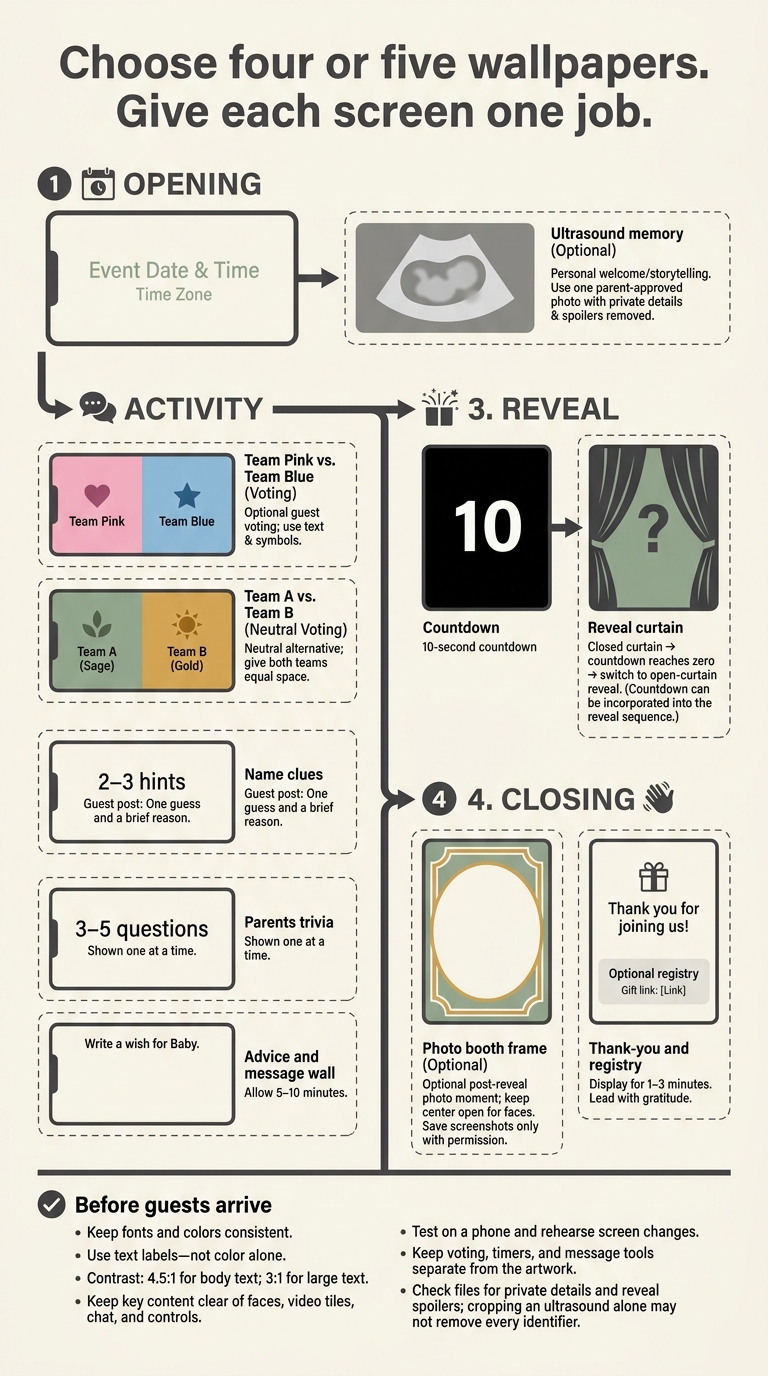
1. Countdown Screen Wallpaper
Use a countdown wallpaper after the game or voting screen to bring everyone’s attention to the reveal.
Choose a neutral, festive background with gold and white confetti, balloons, or stars, and put the timer front and center. Make this the last screen before the reveal, after mingling or voting. A 10-second countdown gives everyone a clear cue to focus.
Keep the timer large and high-contrast so it’s easy to read on any screen. On GenderReveal.live, use the countdown to move from guesses or votes into the reveal.
2. Team Pink vs. Team Blue Wallpaper
When the countdown ends, switch to the prediction poll.
Split the wallpaper vertically into pink and blue halves. Label both sides, add a symbol for each team so color isn’t the only cue, and place “Cast Your Vote” in the center.
Use this wallpaper as the live prediction poll screen on GenderReveal.live. Keep voting optional, and frame the colors as playful guesses - not final labels. Leave the center clear for the prompt and controls.
3. Team A vs. Team B Neutral Wallpaper
Keep the same voting format, but swap pink and blue for sage green and warm gold. Give Team A and Team B equal space. The softer colors keep the screen calm and polished, with a less expected look. For more creative online gender reveal ideas, consider mixing these palettes with interactive games.
Place the prompt near the top or along the edges so the center stays clear for the host’s camera. Preview the wallpaper on a phone to check that both labels are easy to read.
4. Name Clue Wallpaper
Use this wallpaper for a quick mid-party guessing break between the voting screen and the final reveal, or use an AI gender reveal ideas generator to find more inspiration. Let it frame the clue prompt and keep the screen uncluttered.
Add 2–3 clues, such as a first initial, letter count, or family connection. Ask guests to post one guess and a brief reason in chat.
Keep the clues broad so they don’t give away the surprise. Frame them around possible names, not gender labels, and save the answer for the reveal screen.
5. Trivia Challenge Wallpaper
After the name clues, keep the energy up with Parents Trivia on the shared screen. Use 3–5 questions, shown one at a time, as a short bridge to innovative online gender reveal ideas.
Give each question a large heading and clearly labeled answer choices. Add a prompt asking guests to answer in the chat, and read each question aloud. Focus on the parents’ childhoods, family traditions, or baby facts - not gender stereotypes.
Show the answers, name the winner, and move straight to the reveal-curtain wallpaper.
6. Ultrasound Memory Wallpaper
Neutral Keepsake Frame: Create a quiet pause between activities with a calm pregame screen that adds a warm, personal touch. Place one parent-approved ultrasound photo on a cream or sage background, paired with a short, neutral caption.
Protect privacy and the surprise: Remove names, medical record numbers, dates of birth, appointment dates, and hospital or clinic names. Ultrasound images may contain visible or embedded patient information, so cropping alone may not remove every identifier. Hide any sex-related clues, then move straight to the next game screen. For more creative gender reveal ideas and safety tips, explore our blog.
7. Advice and Message Wall Wallpaper
Baby Wishes Wall: Pair a soft, celebratory background with a simple note-card design and one clear prompt:
“Write a wish for Baby.”
Place this activity between the games and the reveal for a heartfelt pause. Give guests 5–10 minutes to share advice, congratulations, or wishes, then read a few notes aloud.
Use the built-in message feature on GenderReveal.live to collect the notes and save them as a memory book. Then switch to the reveal-curtain wallpaper.
8. Reveal-Curtain Wallpaper
Cream-and-Gold Curtain: Pair closed cream or gold drapes with a bold reveal message in the center.
After the final game or message wall, switch to this screen for the final countdown. At zero, switch to an open-curtain version with a clean center panel so everyone shares the reveal moment. A curtain-opening animation can help smooth the transition.
Test the wallpaper on both a phone and a laptop to make sure the text stays readable and nothing gets cropped.
9. Photo Booth Frame Wallpaper
Pastel Balloon Frame: Add a cream border with pastel balloons and “Welcome, Baby!” along the bottom. Leave the center open so faces and shoulders stay visible.
Show this wallpaper right after the reveal for a quick photo moment. Invite guests to turn on their cameras, strike a pose, and save screenshots as keepsakes.
Keep participation optional, and let guests choose which images go into a private gallery. Then switch to the thank-you screen.
10. Thank-You and Gift Registry Wallpaper
Soft Sage Thank-You Screen: Pair a sage-and-cream background with a large thank-you headline, the parents’ names, and a short message like:
“Your love and support mean the most.”
Display it for the final 1–3 minutes, giving guests time to read it before they leave.
Use large, high-contrast text that’s easy to read on phones and livestreams. Stick to one clear call to action: a QR code with a short backup link. Label it “Optional registry” to make clear that gifts aren’t required. On GenderReveal.live, keep the registry link separate so the wallpaper stays clean.
After the closing screen, review the full wallpaper set side by side and remove anything that feels crowded.
Compare the Wallpapers and Finish Your Setup
Match each wallpaper to a specific point in the party. Give each wallpaper one job.
| Wallpaper |
Event phase |
Primary purpose |
Spoiler risk |
Best use |
| Countdown screen |
Arrival and opening |
Build anticipation |
Low |
Shared countdown timer |
| Team Pink vs. Team Blue |
Prediction period |
Collect guesses |
Low to medium |
Live voting |
| Team A vs. Team B |
Prediction period |
Offer a gender-neutral guessing option |
Low |
Prediction poll |
| Name clue |
Clue round |
Prompt guests to guess |
High |
Chat guesses |
| Trivia challenge |
Before the reveal |
Keep guests engaged |
Medium |
Host-led quiz |
| Ultrasound memory |
Storytelling segment |
Share a milestone |
High |
Short host story |
| Advice and message wall |
Between games and reveal |
Gather supportive notes |
Low to medium |
Guest wishes |
| Reveal curtain |
Main announcement |
Keep the surprise hidden until the final switch |
Very high |
Trustee mode reveal |
| Photo booth frame |
After the reveal |
Record reactions |
Low |
Screenshots with permission |
| Thank-you and gift registry |
Closing |
End with gratitude |
Low |
Registry link |
Run through this setup checklist before guests arrive:
- Prepare every wallpaper and transition screen.
- Stick to one typeface, color palette, and visual style.
- Check readability on phones, laptops, tablets, and large displays.
- Keep names, instructions, and key visuals clear of webcam frames and platform controls.
- Store reveal files separately, and limit access to the trusted organizer.
- Rehearse screen changes in order, including the transitions into and out of the reveal.
- Test every interactive link, poll, message prompt, and gift registry reference before sharing the invitation.
Use GenderReveal.live RSVP tools to track attendance. Use that same RSVP data to plan screen timing around your guest count and speed up the final polish pass.
Get permission before saving or sharing guest messages, photos, or screenshots. Keep approved files in a restricted folder.
Once the sequence is set, trim any screen that feels crowded or repetitive.
Final Thoughts: Let Each Wallpaper Serve a Purpose
Keep only the screens that help the party move from one stage to the next. Choose four or five wallpapers that fit your guest list, party length, and baby celebration style. Give each one a single job - welcome, engage, reveal, or close - matched to the opening, activity, reveal, or closing stage. This keeps the flow smooth from the welcome screen to the reveal.
Give guests one clear action at a time, and use labels and symbols on team screens. Keep private details off shared wallpapers, and save a clean reveal image for screenshots. Choose designs that help every guest take part without drawing attention away from the reveal.
FAQs
What size should my reveal wallpapers be?
Use a 16:9 format at 1280 × 720 pixels for virtual reveal wallpapers, especially on-screen backgrounds for your countdown and reveal moment. This keeps text and graphics sharp across common video-chat and screen sizes, so guests can easily read names and clues and see your pink-and-blue or team visuals.
How can I keep the reveal a surprise for both parents?
Use Trustee Mode on GenderReveal.live to keep the reveal a surprise. Ask your doctor or a trusted friend to receive the ultrasound results and keep them in a sealed envelope. Then, give your designated trustee a secure, private link to upload the gender-specific content or animation without you seeing it.
You can plan the event and enjoy the big reveal right alongside your guests.
What should I show if the reveal screen freezes?
If your reveal screen freezes, switch to a backup device, such as a tablet or spare phone. Keep it logged in and ready to take over the stream. Ask your co-host to let guests know about the brief technical delay in the chat.
If the live feed stays unstable, share a prerecorded version of your reveal moment so everyone can still celebrate the big news.