

Interactive Chat Ideas for Virtual Gender Reveals
A virtual gender reveal feels better when guests have something to do, not just something to watch. The simplest way is to use chat for 4 jobs at once: let people guess, build suspense, help guests talk, and save messages for later.
Here’s the short version:
- Prediction games get people involved fast with voting-based gender reveal ideas like emoji votes, polls, and side guesses like due date or birth weight.
- Live reveal hype keeps everyone on the same moment with a countdown, last-second prompts, and instant reaction bursts.
- Guest connection turns the feed into a group conversation with intros, guess stories, and parenting tips.
- Keepsake moments turn chat into something you can look back on, like baby notes and first reactions.
A few setup steps matter too:
- Share the start time in U.S. format with the time zone.
- Use RSVPs so you know who’s coming and can send reminders.
- Ask one person to help run the chat.
- Post one easy prompt before the reveal starts.
In practice, that means fewer quiet gaps, more replies, and a better shared moment for guests joining from different places. Even simple prompts can get strong participation, and live polls often pull in more responses than open-ended questions because they take just one tap.
This article breaks those ideas into a simple plan you can use before, during, and right after the reveal.
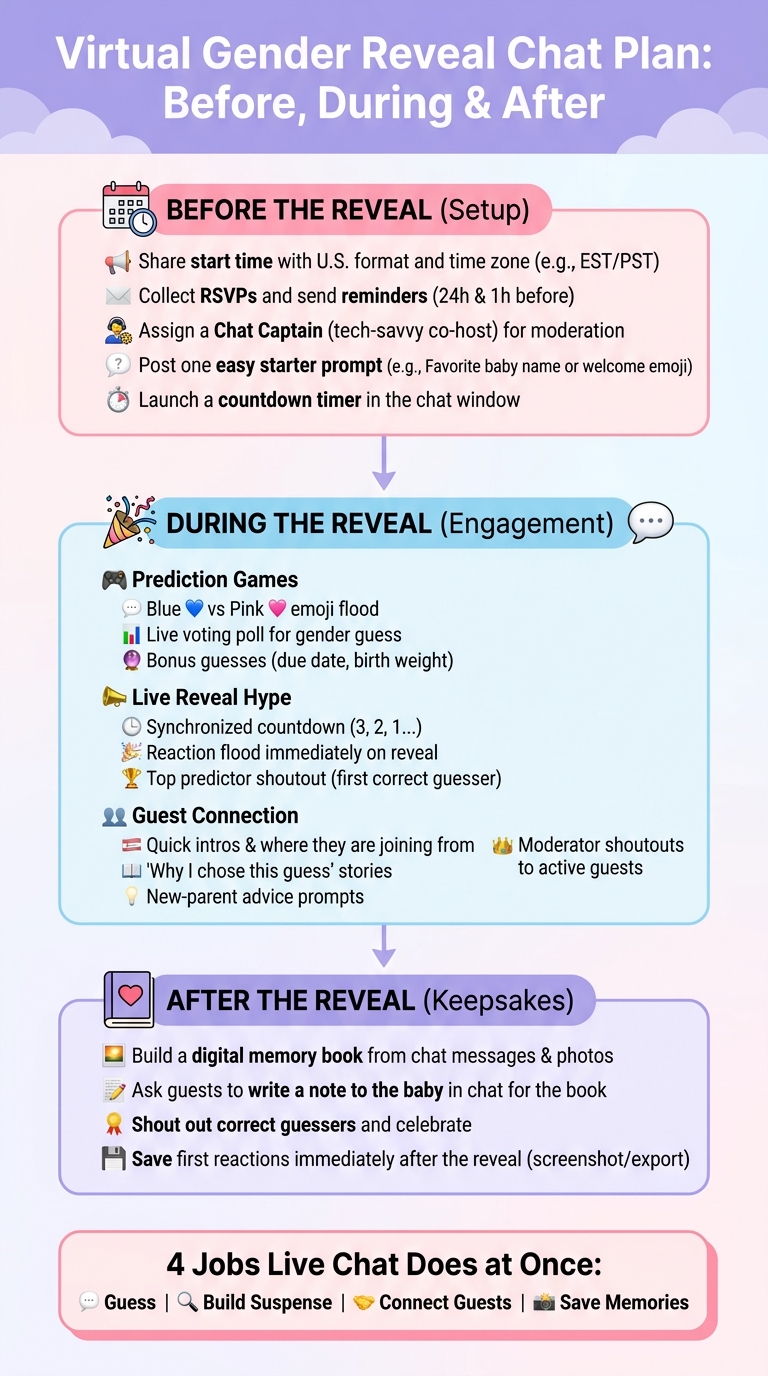
Virtual Gender Reveal Chat Plan: Before, During & After
Why Live Chat Works So Well for Virtual Gender Reveals
Live chat brings the feel of online gender reveal ideas to life. You still get the gasps, laughter, and shared suspense, but now it all happens in real time on a screen. That instant buzz makes it much easier for every guest to take part.
That matters even more when guests can join in without feeling put on the spot. Live chat takes some of the pressure off shy guests. They can jump in with an emoji, a quick guess, or a short cheer instead of having to speak up in front of everyone.
It also fills the waiting time in a fun way. Guests can trade predictions, drop inside jokes, and react as the moment builds. And that kind of momentum is a good reason to keep the setup simple.
The best part? Those reactions don't have to vanish once the reveal is over. GenderReveal.live can save the message thread as a keepsake, so every cheer and quick guess becomes a chat recap you can look back on later. Once the why is clear, the next step is making the chat easy to manage.
sbb-itb-bc05356
How to Set Up a Smooth, Fun Chat Experience
Start with the basics: share a clear start time in U.S. date-and-time format, and include the time zone. That way, every guest knows exactly when to join and everyone stays on the same schedule.
RSVPs also help keep things tidy. They make the guest list easier to track and give you a simple way to send reminders before the event. If you're hosting on GenderReveal.live, the built-in RSVP management takes care of this for you. You get real-time headcount, automated reminders, and guest check-ins all in one place.
It also helps to assign a Chat Captain. Pick a tech-savvy friend or family member to act as a co-host. They can welcome guests, post a starter prompt, and handle any audio issues. That way, the parents-to-be don’t have to juggle tech problems in the middle of the moment and can just be present.
Right before the event begins, post one simple prompt. A favorite baby name, a welcome emoji, or a quick hello works well. It gives guests an easy way to jump in fast and keeps the chat active before the reveal.
A countdown timer can tie the whole thing together. When everyone sees the same clock ticking down to zero, the group shares the moment at the same time. GenderReveal.live includes this in the same link as the countdown, live voting, and reveal, which makes the chat feel more connected and easy to follow. Once the chat is set, you can use that countdown to spark real interaction.
1. Prediction Games
Getting guests to guess before the reveal is one of the easiest ways to build anticipation in the chat. The countdown helps each guess feel like part of the moment, not just filler before it. Keep prompts simple so people can join with one tap or a short message.
- Blue vs. Pink Emoji Flood: Ask everyone to drop 💙 for boy or 🩷 for girl at the same time.
- Live Voting Poll: Run a simple boy-or-girl poll before the big moment. If you're using GenderReveal.live, the built-in live voting updates instantly.
- Bonus Guesses: Go past gender and ask guests to predict the due date, birth weight, or another custom question. Rotate one bonus question at a time so replies keep coming.
- Trustee Mode Surprise: Use trustee mode so the parents-to-be can stay surprised. They can still join every prediction game and react in the moment when the answer appears.
2. Live Reveal Hype
Use the last few minutes to build momentum. Live chat makes the reveal feel like a shared countdown, not a passive stream, especially when using creative online gender reveal ideas.
- Synchronized Countdown: A shared countdown timer keeps everyone on the same rhythm, even across time zones. Use it to cue the last round of guesses and reactions. At 60 seconds, post one final nudge: "Stop everything - we're almost there."
- Reaction Flood on Reveal: The second the gender is announced, invite everyone to flood the chat with exclamation points, heart emojis, and ALL-CAPS cheers. Those instant reactions make the moment feel bigger and more fun. They also give you the perfect opening for personal replies and quick shoutouts.
- Top Predictor Shoutout: Share a quick leaderboard or call out the closest guesses to keep the chat moving.
After the reveal, shift the chat from hype to congratulations and guest shoutouts.
3. Guest Connection
After the first wave of reactions, use the chat to help guests connect with each other and with the parents-to-be. Once the big reveal buzz settles down, move the chat from instant reactions to actual conversation.
- Quick Introductions: Ask guests to share their name and how they know the parents-to-be. You can post: "Share your name and how you know the parents-to-be." Once people chime in, the chat starts to feel less like a comment stream and more like a room full of people.
- Why I Chose This Guess: Turn simple guesses into a real back-and-forth by asking guests why they picked their answer. Maybe it was an old wives' tale, a gut feeling, or even a dream. Those small stories make the reveal more personal and give people something to reply to.
- New-Parent Advice: If the chat slows down, post: "Drop your best new-parent tip below." GenderReveal.live can collect those replies for later.
- Moderator Shoutouts: Ask a trusted friend or family member to moderate the chat. They can call out guests by name, answer questions, and keep the conversation moving so everyone feels included, no matter where they’re joining from.
4. Keepsake Moments
Use the chat to hold onto the moment after the reveal. Once everyone knows the news, keep the chat going with prompts people will want to look back on later.
- Build a Digital Memory Book: Invite guests to leave heartfelt messages and reactions. GenderReveal.live can save them as a ready-made keepsake.
- Ask for a Message to the Baby: Have guests write one note for the baby to read later. Prompt: "Write one thing you want this little one to know."
- Shout Out Correct Guesses: After the reveal, go back to the guests who guessed right and give them a little love in the chat. If you test the live voting results on a demo platform, it's an easy way to keep people talking.
Then grab those reactions while the moment still feels brand new.
- Save First Reactions: The first few seconds after the reveal matter most. Ask guests to post their first reaction right away. Those off-the-cuff replies make the saved chat log feel fun and full of life when you read it later.
Tips for Making the Reveal Feel Personal and Easy to Manage
Once the reveal page is live, a few simple prompts can make the chat feel warm without turning it into chaos. The easiest way to do that is to alternate quick prompts with more personal ones. For example, you might start with a fast prediction poll, then switch to something more heartfelt, like using an AI gender reveal ideas generator to find unique ways for guests to share memories with the parents-to-be.
After a few short exchanges, use the countdown to pull everyone back to the main event. Send the link early so guests have time to join and settle in before the big moment. A countdown timer helps keep everyone in sync.
Trustee Mode lets a trusted friend enter the result, so your reaction stays live and genuine. And once the reveal is over, a short welcome note can make the chat feel personal from the very first message.
Add a brief welcome message to the reveal page so guests feel included right away and part of the moment.
Conclusion
The main point is simple: a few well-timed polls, fast reactions, and heartfelt messages can help guests feel part of the moment from anywhere.
These features keep the energy moving. Polls build anticipation, chat prompts get people talking, live reactions catch the reveal as it happens, and saved messages help you hold on to it.
If you want all of that in one place, GenderReveal.live brings it together with live voting, countdown timers, message collection, and Trustee Mode, so you can focus on the celebration.
Keep the prompts short, keep the tone warm, and let the chat do its thing.
FAQs
How many chat prompts should I plan?
Plan 3 to 5 chat prompts to keep the virtual gender reveal fun and active.
A few simple prompts can go a long way. You can ask guests to:
- Vote on whether they think the baby is a boy or a girl
- Share their best guess for the baby's birth date, weight, or name style
- Post a short message for the parents-to-be
- Drop one word that describes their reaction after the reveal
- Share who they think the baby will look like
Space these prompts out during the event so the chat doesn't go quiet. One before the reveal, one during, and one right after usually works well.
What if guests join late or miss the countdown?
You can record the session and share the reveal later, so people who join late can still be part of the moment.
Real-time chat and notifications help keep everyone involved too, even if they miss the countdown.
How do I keep the chat active without feeling forced?
Invite guests to react in the moment - whether that’s sharing their excitement, offering congratulations, or tossing out a guess. Those live reactions make the whole thing feel more natural and a lot more fun.
You can also add simple interactive elements, like prediction games or reaction emojis, so people feel part of the moment without feeling put on the spot. And a little prep goes a long way: test your tech ahead of time and give clear instructions so everyone can join in with ease.