

Recommended tech specs for virtual baby reveals
You do not need fancy gear for a smooth virtual baby reveal. In most cases, I’d focus on 3 Mbps+ upload speed, stable Wi‑Fi or Ethernet, a current browser, a clear camera, a quiet mic, and a backup device or hotspot.
Here’s the short version:
- Internet first: I’d check the host’s upload speed before anything else. 3 Mbps is the floor; 10+ Mbps gives more room.
- Connection matters: Ethernet is best. If that’s not an option, 5 GHz Wi‑Fi is the next pick.
- Device check: A current phone, tablet, or computer usually works fine if it’s updated and charged.
- Browser check: Use the latest Chrome, Edge, or Safari. Old browsers often cause frozen pages, broken countdowns, or sync issues.
- Camera and audio: A built-in camera and mic are often enough, but the camera should stay still and the room should be quiet.
- Backup plan: Keep a charged second device, a hotspot-ready phone, and a trusted helper ready in case the host drops offline.
What stood out to me is this: timing and stability matter more than expensive equipment. A $0 fix like plugging in a laptop, updating a browser, or moving closer to the router can do more than buying new gear.
7 TIPS FOR A SUCCESSFUL VIRTUAL BABY SHOWER/GENDER REVEAL|Detailed games, instructions, worries etc.
sbb-itb-bc05356
Quick comparison
| Category | Basic setup | Better setup |
|---|---|---|
| Upload speed | 3 Mbps+ | 10+ Mbps |
| Connection | Stable Wi‑Fi | Ethernet |
| Device | Smartphone or tablet | Laptop or desktop |
| Browser | Latest mobile Safari/Chrome | Latest desktop Chrome/Edge |
| Camera | Built-in camera | 1080p webcam |
| Audio | Built-in mic | USB mic or wired headset |
| Backup | Cellular data | Hotspot + second device |
If I were setting this up, I’d do one 5-minute test run on the same device and browser I planned to use on event day. That one step can prevent most last-minute issues.
What a Solid Tech Setup Looks Like for a Virtual Baby Reveal
The line between a stressful event and a smooth one usually comes down to a few simple choices you make before things begin. Once you’ve got that part handled, the setup is just a handful of quick checks.
Basic setup: stable connection, working camera, clear audio
At the basic level, you only need the core pieces: a stable internet connection, a charged device, a clear camera, and an echo-free mic. That’s the stuff that matters most.
Whether you’re using a phone, tablet, or laptop, guests should be able to see and hear the big moment without lag or confusion. And the host should be able to stream without constant freezing. Browser-based access makes this easier since guests can join from a single link with no downloads.
Better setup: more speed and fewer interruptions
A better setup helps cut down on dropouts. Ethernet is best, and 5 GHz Wi-Fi is the next choice. If the host can use a laptop or desktop with an up-to-date browser, the stream will usually feel a lot steadier.
It also helps to have a backup ready. A mobile hotspot or a spare charged device can save the day if your main setup hits a snag.
Why reliable basics beat expensive gear
An expensive camera won’t fix shaky Wi-Fi. Clear audio and steady video matter more than fancy gear.
Here’s the quick version:
| Setup Level | Key Features |
|---|---|
| Basic | Stable Wi-Fi, charged device, clear camera and echo-free mic, browser-based access |
| Better | Ethernet or 5 GHz Wi-Fi, laptop/desktop, up-to-date browser, mobile hotspot backup |
With the setup defined, the first thing to check is upload speed.
1. Internet Upload Speed
Upload speed is the first thing to check if you want a smooth live reveal. Aim for at least 3 Mbps upload speed for a stable stream. The host’s upload speed is what determines how cleanly the reveal reaches every guest at the same time. Put simply, you want a steady connection that keeps the reveal in sync for everyone.
If the connection is shaky, low upload speed can lead to audio cuts, frozen video, and echo. Before the event, run a quick platform test on the same device and browser you’ll use live.
Once upload speed is covered, the next thing to check is how the host connects to the internet.
2. Wi-Fi or Ethernet Connection
The host’s connection matters most because it controls the live stream everyone sees. So before you look at anyone else’s setup, lock in the host connection first. After that, check the device itself.
Speed matters, but the type of connection matters just as much. A shaky connection can throw everything off at the worst time. If it drops or slows down, common video call tools can trigger audio cuts, frozen video, and echo. And when that happens, the reveal can get delayed.
If timing is tight, skip public live streams. They add one more thing that can go wrong. It’s also smart to keep a short backup recording ready to share in case the live stream fails.
Next, make sure the host device can handle the call without lag.
3. Compatible Device
Once your connection is stable, your device needs to do its part too. The good news? A modern smartphone, tablet, or computer is usually all you need to join or host a virtual baby reveal. For most guests, a simple browser link is enough to get in fast.
Use the newest operating system and browser available on your device, then test the event page before the reveal. That small step can save you a lot of stress later. Older devices can struggle to load the page or keep video and audio running smoothly.
Battery life matters more than people think. If you're hosting, keep your main device plugged in during the event. A low battery can affect audio and video quality at the worst possible moment.
If you plan to move around during the reveal, a smartphone or tablet makes things much easier. It gives you more freedom without turning the setup into a hassle. It also helps to keep a fully charged backup device nearby with the event link ready to open.
Next, check browser support, because even a good device still needs the right browser.
4. Browser Support
Even a good device still needs a current browser. Most guests will join from a shared link in their browser, with no extra setup.
Use the latest version of Chrome, Edge, or Safari, based on the device. Those browsers help keep the live reveal in sync so everyone sees the same thing at the same time. Browser-based platforms like GenderReveal.live also make it easy for guests to jump in fast from a single link.
The biggest issue is usually an old browser. Older versions can make the virtual gender reveal countdown freeze, cause live voting to stop working, or make the reveal animation glitch. Before the event, take a minute to check for updates so the experience runs as smoothly as possible.
If the page stalls, refresh it once. If that doesn’t work, reopen the original invite link in a current browser. It also helps to add a simple browser note to the invite: Safari on iPhone, Chrome on Android. For more inspiration, check out these online gender reveal ideas to make your event even more interactive.
Once the browser is covered, check the camera so the reveal looks as clear as it plays.
5. Camera Setup
With the device and browser ready, it’s time to check the camera view. A modern smartphone or a laptop webcam is usually more than enough for a clear virtual baby reveal. The point isn’t fancy gear. It’s making sure guests can see the moment clearly.
What matters most is a steady shot of the parents and the reveal itself. A smartphone on a tripod or any stable surface usually gives the cleanest angle.
Once the framing looks good, the platform should handle the reveal smoothly. On GenderReveal.live, the reveal stays synchronized for guests even if the camera lags.
After the camera is set, the next step is checking audio so guests can hear every reaction clearly.
6. Microphone and Audio Quality
Once the video looks steady, audio becomes the next thing people notice. Clear sound keeps the countdown and reactions together. If guests can’t hear the reveal, the moment loses a lot of its punch.
For most virtual baby reveals, the built-in mic on a smartphone, tablet, or laptop is good enough. You don’t need fancy gear. You just need sound that’s clear, so everyone can stay in the moment even when they’re joining from different devices.
That said, standard video calls can still cause problems. Audio can cut out, lag, or bounce back as echo during group events. And if someone has to jump in and say the result out loud because the sound failed, the surprise is gone.
A few simple habits help keep audio clean:
- Stay in a quiet room to cut background noise.
- Test for echo before guests arrive.
- Use the synchronized countdown if audio drops.
If the sound starts acting up, let the countdown do the work. On GenderReveal.live, the synchronized reveal timing keeps the moment moving even if the audio glitches.
If audio still goes wrong, a backup plan is your last safety net.
7. Backup Plan for Tech Problems
After speed, connection, device, browser, camera, and audio, the last safeguard is a clear backup plan. Even with solid prep, tech can still fail. When that happens, you need to know exactly what to do.
Keep a charged backup device, a hotspot-ready phone, a backup link, and one trusted helper who can trigger the reveal.
Browser-based access makes this a lot easier. Guests can switch devices fast without reinstalling anything.
And if video fails? The countdown can still land on time for everyone who’s watching.
Use the fallback that fits the problem:
| Problem | Immediate Fallback Action |
|---|---|
| Video stream freezes | Rely on the platform's synchronized countdown animation, which uses less bandwidth than live video |
| Guest can't join | Refresh once, then resend the link; guests can open it in a mobile browser |
| Host loses internet | The trusted helper triggers the reveal for all connected guests at the scheduled time |
Quick Comparison Table: Basic vs. Better Setup
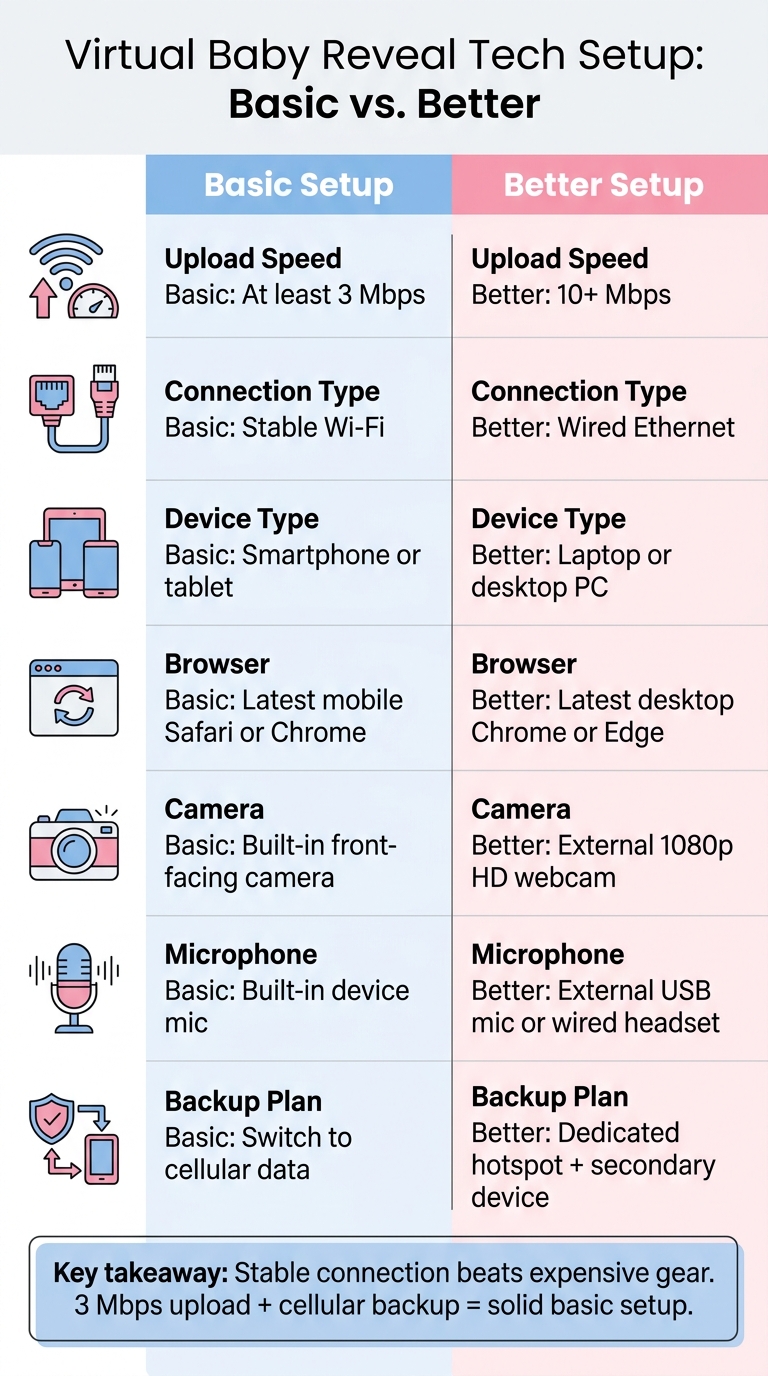
Virtual Baby Reveal Tech Setup: Basic vs. Better
Not every family needs the same tech setup. A small family reveal can run just fine with the basics. But if you're planning a bigger event with polls or other interactive features, it's smart to use creative online gender reveal ideas that prioritize stability.
Here’s a side-by-side look at what each option means in practice:
| Category | Basic Setup | Better Setup |
|---|---|---|
| Upload Speed | At least 3 Mbps | 10+ Mbps |
| Connection Type | Stable Wi-Fi | Wired Ethernet |
| Device Type | Smartphone or tablet | Laptop or desktop PC |
| Browser | Latest mobile Safari or Chrome | Latest desktop Chrome or Edge |
| Camera | Built-in front-facing camera | External 1080p HD webcam |
| Microphone | Built-in device mic | External USB mic or wired headset |
| Backup Plan | Switch to cellular data | Dedicated hotspot + secondary device |
The biggest difference comes down to stability. Wired Ethernet and an external mic can help cut down on frozen video, dropped audio, and that muffled sound everyone notices right away.
If your upload speed stays at 3 Mbps or more, your camera looks clear, and you’ve got cellular backup ready to go, a basic setup should do the job.
Once you’ve handled the tech side, built-in RSVP and sharing tools can make guest management a lot easier.
Platform and RSVP Tools That Can Make the Event Easier
After the connection, device, and browser checks, the platform itself should make joining simple. Once those basics are in place, the right platform can take a lot of pressure off the rest.
Browser-based tools cut down on setup steps
Browser-based platforms make things easier for guests. There are no downloads, no account sign-ups, and just one link that works across phones, tablets, and laptops.
That matters more than it might seem. The fewer hoops people have to jump through, the more likely they are to join on time without texting you for help two minutes before the reveal.
RSVP and sharing features help guests prepare in advance
Built-in RSVP tracking shows who’s coming, sends automated reminders, and gives you a live head count. GenderReveal.live includes RSVP management and easy sharing, so guests can test their setup before the reveal.
That extra step helps. Guests get time to open the link, check their device, and sort out any issues before event day instead of scrambling at the last minute.
Interactive features should work on everyday home devices
Countdown timers, live voting, and reveal controls only help when they run well on the devices your family already has at home. Modern reveal platforms are built with that in mind.
GenderReveal.live includes live voting, a trusted-helper mode for surprise reveals, heartfelt message collection, and themed templates - all through a standard browser experience.
A synchronized countdown keeps every screen locked to the same reveal moment.
With the platform chosen, use a quick host-and-guest checklist to catch last-minute issues.
Pre-Event Checklist for Hosts and Guests
Run a quick checklist the day before, then do one more pass right before showtime. That small bit of prep catches most tech issues early.
Start with the platform's RSVP list and reminder tools. Then move through these final checks.
Host checklist
Do these checks 24 hours before the event:
- Test your connection. Run a speed test, and keep a mobile hotspot ready.
- Open the event link on a second device. Make sure the page loads on a phone or tablet.
- Frame your camera and check your lighting. Test lighting at the same time of day as the reveal. Natural light can change fast.
- Check your audio. Do a 10-second mic test. Make sure people can hear you clearly, without echo or background noise.
- Update your browser. Handle this before the event, not right before guests arrive.
- Charge a backup device. Keep a charged phone or tablet nearby, just in case.
- Check your RSVP list and send reminders. Confirm who's coming, and send a reminder so guests have the link and enough time to get ready.
Run a GenderReveal.live demo too, so you can practice the countdown and reveal controls.
Once your side is set, send guests the same simple checklist.
Guest checklist
Guests only need a few quick checks to avoid last-minute glitches.
- Join a few minutes early to test the page and volume.
- Turn off silent mode and raise the volume so you can hear the countdown and reveal.
- Use stable Wi-Fi, not spotty public data.
- Plug in your device before joining.
Conclusion
A smooth virtual baby reveal starts with a stable connection and a simple backup plan. This is a key part of planning an online baby shower or reveal event. Good bandwidth matters more than fancy gear.
Once you’ve gone through the checklist, do one short rehearsal before guests join. Run a 5-minute test: open the link, start the countdown, and check the video, audio, and timing. That small step can save you a lot of stress once everyone logs in.
The virtual baby reveal platform you choose helps here too. Browser-based tools with built-in countdowns and RSVP tracking make things easier for guests and help keep the reveal on time for everyone.
Show up early, run through your checklist, and keep your backup link ready. The goal isn’t perfect tech. It’s a calm, shared moment. When the setup is simple and steady, the reveal stays front and center.
FAQs
What internet speed is enough for a virtual baby reveal?
For a smooth virtual baby reveal, you’ll want a steady internet connection that can handle video streaming. A broadband or 4G connection is usually the best fit if you want to avoid frozen video or audio cutting out.
Browser-based platforms like GenderReveal.live work best when your connection holds steady. That way, everyone has a better shot at seeing the big moment in real time, with less buffering.
Should I use Wi-Fi or Ethernet for the host setup?
Yes - Ethernet is a great pick for the host setup if you want the most stable experience possible.
A wired connection gives you a direct, steady link to your router. That can help cut down on lag, audio dropouts, and video freezing. It also skips the interference that can hit Wi-Fi, so your reveal stays smooth and in sync for guests.
What should my backup plan include if tech fails?
Start with a test run before the celebration. A small mock event gives you a chance to make sure the setup feels easy to use and that each feature works well across phones, tablets, and computers.
A dependable browser-based platform like GenderReveal.live makes things simpler too. Guests can join without downloads or a messy app setup. If anything comes up, reach out to the support team for help.