

Digital Christmas Pregnancy Announcement for Remote Family
If my family is far apart, the best Christmas pregnancy announcement is usually the one that is easiest to open and easiest to understand. In most cases, that means I keep it simple: use a digital card, a private link, or a short live reveal, pick a clear holiday design, and share it at a time that works across U.S. time zones.
Here’s the short version:
- Digital cards work well when I want no scheduling stress.
- Private links help me tell close family first.
- Live reveals make sense when I want everyone reacting together.
- Early December is often easier than Christmas Eve or Christmas Day.
- A 7:00 PM Eastern start lines up well for many U.S. families.
- For older relatives, a one-click browser link is often easier than an app.
- A short line like “Baby [Last Name] is our best gift this Christmas - arriving June 2027” gets the point across fast.
About 16% of Americans live in multigenerational households, and many families now split time across states and time zones. That makes timing and ease of use a big part of the announcement - not just the design.
Quick Comparison
| Format | Best For | Main Tradeoff |
|---|---|---|
| Digital card | Easy sharing, no live scheduling | No live group reaction |
| Private link | Small first-round sharing | Less group energy |
| Live reveal | Real-time reactions | More timing and tech issues |
What I’d do is simple: pick the format my family already uses, keep the message short, and make sure grandparents can join without extra steps.
sbb-itb-bc05356
Choose the right digital format for your family
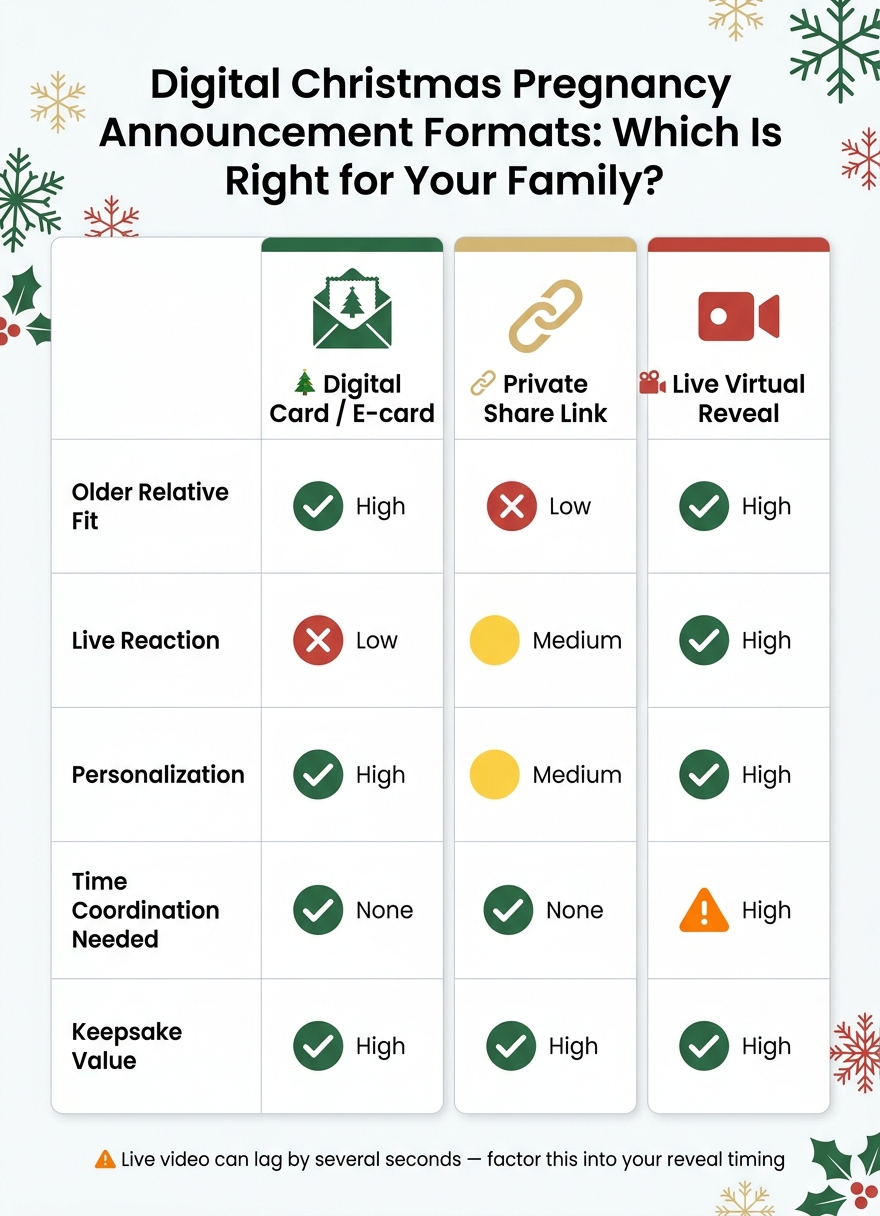
Digital Christmas Pregnancy Announcement Formats: Which Is Right for Your Family?
Pick the format your family will use, not the one that only sounds good in theory. You have three practical choices: a digital card or e-card, a private share link, and a live virtual reveal. Here’s the fast comparison.
| Format | Older Relative Fit | Live Reaction | Personalization | Time Coordination | Keepsake Value |
|---|---|---|---|---|---|
| Digital Card / E-card | High | Low | High | None | High |
| Private Share Link | Low | Medium | Medium | None | High |
| Live Virtual Reveal | High | High | High | High | High |
Live video can lag by several seconds, which can throw off a surprise.
Holiday e-cards and photo announcements
If your family is spread across several U.S. time zones, an e-card is often the easiest pick. Each person can open the news when it works for them, and no one has to scramble to join a call at the right moment. Clean holiday visuals also make the announcement clear right away.
If you want more control over who sees the news first, a private share is the better move.
Private posts and share links for close family first
Start with parents, siblings, and anyone who might feel hurt if they found out at the same time as a distant acquaintance. A private link sent by text or email keeps the circle small and the moment more personal. Public posts can travel fast, and once they’re out, they’re out.
If seeing everyone react at once matters more than convenience, using online gender reveal ideas makes more sense.
Live virtual reveals for real-time reactions
For remote Christmas news, a live reveal works best when you want everyone reacting together instead of piecing things together across separate calls. A platform like GenderReveal.live gives you a countdown timer, live voting, and message collection through one browser link - no app download or account required. That tends to matter a lot for grandparents joining live.
Pick a Christmas template and message that look good on any device
Once you know who’s seeing the news first, the next step is simple: pick a template that makes the reveal clear in one glance. That matters more than people think. A good Christmas template should read fast on a phone, tablet, or laptop without making anyone squint or guess.
Here’s a quick side-by-side look at which template type may fit your family best:
| Template Type | Easy to Read on Older Phones | Best Use Case |
|---|---|---|
| Photo (Static) | High | Holiday e-cards and digital keepsakes |
| Text-Only | Highest | Quick updates via text message |
| Video Montage | Medium | Sharing a journey or story leading up to the news |
| Interactive | High | Synchronized reveals for large, remote families |
Classic Christmas visuals that make the news obvious at a glance
The best Christmas pregnancy announcement visuals do one job: make the news obvious at a glance, even on a small screen. That’s why classic holiday cues work so well. A tiny stocking, a holiday ornament, or a Santa hat tells the story fast.
These images come with built-in holiday meaning, so family members can understand what they’re looking at before they even read the caption. That’s a big deal, especially on smaller devices where details can get lost.
Skip templates with busy layouts, tiny script fonts, or low-contrast colors. They’re harder to read, and older screens can make that problem worse.
Short message formulas that feel personal, not cliché
Once the design is clear, the wording should be just as simple. The copy on your announcement needs to be short enough to read in one glance. Think clear first, cute second.
A short Christmas line like this works well:
"Baby [Last Name] is our best gift this Christmas - arriving June 2027."
It shares the news and the timing without piling on extra words. That’s usually all you need.
Keep the message concise, and include the due season or month so people understand it right away.
When to use video or interactive templates instead of a static card
A static photo card makes sense when you want something people can save, screenshot, and come back to later. It’s simple, direct, and easy to share.
But sometimes you want more than that. If you want everyone to feel the news at the same time, not just read it, a short video montage or an interactive reveal can land harder. It turns the moment into an event.
If the announcement is happening live, the template should support timing, not just decoration. For a synchronized reveal, an interactive template like GenderReveal.live keeps everyone on the same moment.
Time the reveal and add a live Christmas moment without overcomplicating it
Once you’ve picked the template, the next call is timing. Treat the reveal time with the same care. A calm, unhurried moment usually leads to better reactions.
Best timing windows during the Christmas season
The table below shows the three windows families pick most often, so you can choose the one that matches your plans.
| Timing Window | Best for Availability | Stress Level | Best for Turnout | Fit with Tradition |
|---|---|---|---|---|
| Early December | High - fewer travel conflicts | Low - avoids the holiday rush | High - people have undivided attention | Good for an early gift theme |
| Christmas Eve | Moderate - often reserved for dinner or church | Medium - timing must be precise | High for immediate family | Fits well with gift-opening traditions |
| Christmas Day | Low - busy with hosting and travel | High - potential for screen fatigue | Moderate if scheduled in advance | Classic Christmas miracle feel, but can be chaotic |
Early December is usually the easiest option. Christmas Eve tends to work best if your family has a quieter pocket of time. Christmas Day fits the holiday theme perfectly, but it also brings the most scheduling pressure. If you want that emotional Christmas-day high point, try the quieter stretch after Christmas dinner.
A 7:00 PM Eastern start lands at 6:00 PM Central, 5:00 PM Mountain, and 4:00 PM Pacific. That’s a dependable window for families across U.S. time zones.
A simple 15- to 30-minute live reveal agenda
A simple run-of-show helps avoid delays across time zones. In most cases, 20 minutes is enough.
- Welcome (5 min): Say hello and do a quick audio/video check for anyone joining remotely.
- Brief catch-up and predictions (5–10 min): Keep it light with holiday chat and baby guesses to build anticipation.
- The reveal (1 min): This is the big moment. Keep it short and let it sink in.
- Reactions and toast (10 min): Make room for laughter, kind words, and a short celebration together.
Easy add-ons: countdowns, polls, and keepsake reactions
A few small interactive touches can make the reveal feel shared without turning it into a production.
A 30-second synchronized countdown helps everyone experience the moment at the same time. You can also run a quick prediction poll before the countdown hits zero. Using an online gender reveal platform makes these features easy to set up. A playful holiday prompt like "Naughty or Nice: boy or girl?" adds a bit of fun. Another nice touch: ask guests to share one Christmas wish for the baby in a message box.
The main thing is to keep it easy enough for grandparents and less tech-savvy relatives to follow without stress.
Help grandparents and less tech-comfortable relatives join without frustration
The best announcement is the one every relative can open without a hassle.
Once you’ve picked the reveal time, make the joining part just as simple. That matters even more for grandparents and relatives who don’t spend much time clicking around apps and links.
Use familiar channels and one-line instructions
Start with the method they already use every day. Send the link by text message, WhatsApp, or plain email, depending on what feels normal to them. Then add one short note: "Click the link below, wait for the virtual countdown, and watch together."
Be clear with the date and time too. Use a plain U.S. format like Saturday, December 20, 2025 at 7:00 PM Eastern so no one has to stop and figure it out. Every click you cut out makes it more likely they’ll be there when the moment happens.
Offer a hybrid option for relatives who want something physical
Some relatives just like having something they can hold. In that case, pair the digital invite with a physical reminder. A simple Christmas card with the link printed on it works well. So does a small gift box they can open during the call.
A mailed Christmas card or small gift box gives relatives a physical prompt and a simple digital path in one step.
Have a backup plan and save the memories
Even with solid prep, things can still go sideways. Someone might lose their connection. Someone else might close the browser by mistake. It happens.
A simple fallback can fix most of it: make a quick phone call, then text a photo of the announcement card. That covers almost every situation and helps no one feel left out of the moment.
FAQs
How do I choose between a card, link, or live reveal?
Choose a card if you want the simplest, low-tech way to share your Christmas announcement by mail or in person.
Choose a link if you want far-away relatives to open one private page on their phone or computer at the same time.
Choose a live reveal if you want one shared surprise moment, along with extras like a countdown timer, prediction games or voting, message collection, and easy RSVPs with automated reminders and one-click check-ins.
What if some relatives are not comfortable with technology?
Choose an easy, browser-based option like GenderReveal.live. Guests can join through a shared link, with no app downloads and no account setup, which cuts out common roadblocks.
It also helps that the experience works well on mobile and across different devices. That makes it simpler for older relatives to join in and keeps the celebration low-stress and open to everyone.
Should I announce in early December or wait until Christmas?
Pick Christmas Eve or Christmas Day only if that timing fits your family best. If not, early December often makes things a lot easier and gives everyone time to join without a last-minute scramble.
A built-in countdown also helps relatives who are far away know exactly when to tune in, while the moment still feels festive and tied to Christmas.