
Checklist for Hosting a Virtual Gender Reveal
Planning a virtual gender reveal? Here's everything you need to know to make it smooth, fun, and memorable. Virtual events save money (costing $50–$200 vs. $500–$2,000 for in-person) and ensure everyone - no matter where they are - can join. Platforms like GenderReveal.live simplify the process with tools like countdowns, live polls, and recording features.
Key Steps:
- Pick a date, time, and platform: Consider time zones and notify guests 2–6 weeks in advance.
- Set a budget and theme: Focus spending on props and decorations for the camera area.
- Plan the reveal moment: Options include confetti cannons, cakes, or digital effects.
- Engage guests: Use games, live polls, and message collections to keep everyone involved.
- Test and prepare: Check your tech, lighting, and backup plans before the big day.
Virtual gender reveals are easy to host, budget-friendly, and connect loved ones worldwide. Let’s dive into the details to make your event unforgettable.
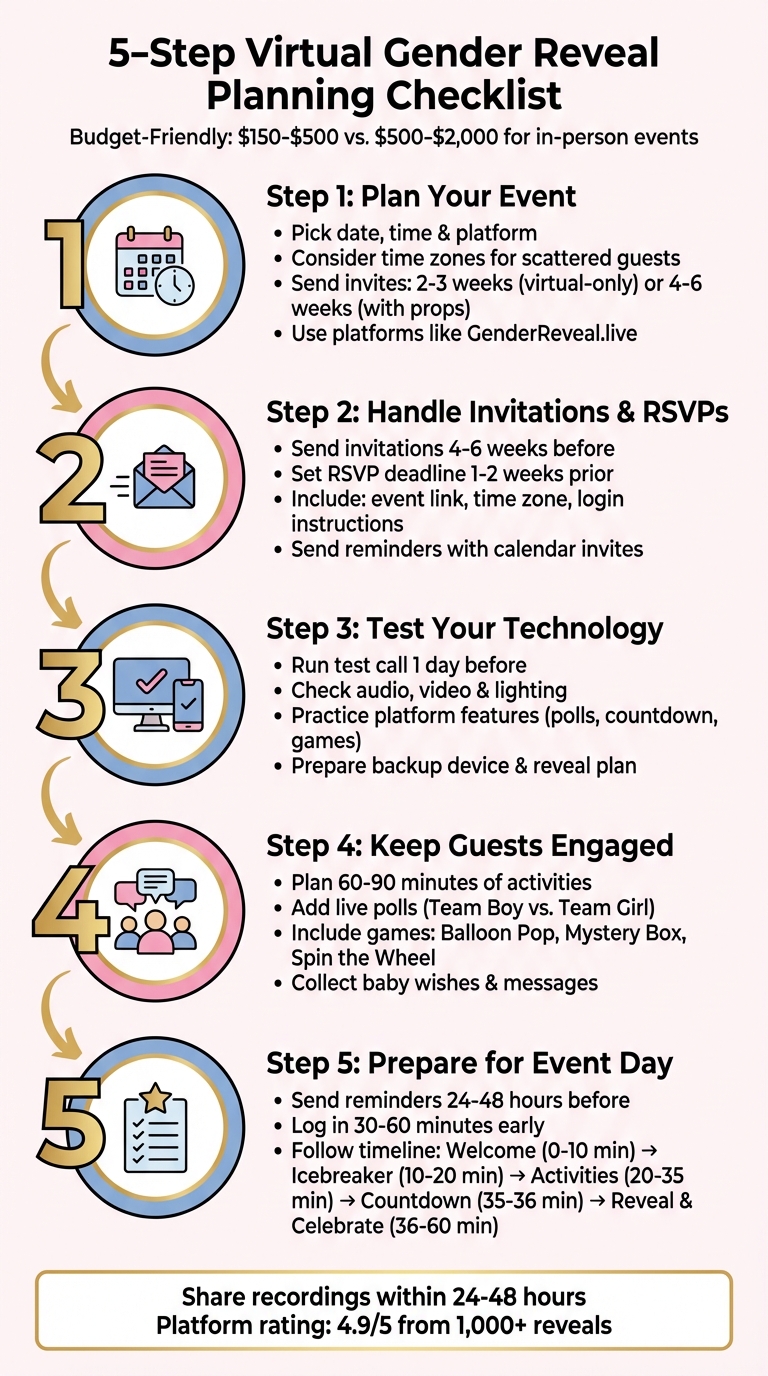
5-Step Virtual Gender Reveal Planning Checklist
Step 1: Plan Your Event
Pick Your Date, Time, and Platform
Think about your guests' time zones. If your family is scattered - like grandparents in New York, siblings in California, and friends in Texas - you’ll need to find a time that works for most of them. A weekend mid-morning or early afternoon slot usually hits the sweet spot.
Give your guests 2–3 weeks' notice for virtual-only events. If you're sending formal digital invitations or mailing out props like confetti poppers or mystery boxes, aim for 4–6 weeks' notice, especially during busy shipping seasons. This extra time helps everyone plan and ensures your event runs smoothly.
GenderReveal.live makes the tech part easy. The platform handles countdown timers, live prediction polls, and more, all in one place. Even guests who aren’t tech-savvy can join without a hitch.
Once you’ve locked in your date, time, and platform, it’s time to tackle your budget and party theme.
Set Your Budget and Theme
Virtual gender reveals are budget-friendly, typically costing between $150 and $500. Hosting online means you skip big expenses like venue rentals and catering while still delivering a memorable experience. Prioritize your spending on two essentials: props for the reveal moment (think balloons, confetti, or cakes) and a reliable digital platform to keep your guests engaged.
Save money by skipping paper invites and focusing decorations on the on-camera area. For example, you can grab 16-inch "Oh Baby" balloons for $9.99 or 40-inch letter balloons for $18.99, keeping your prop costs under $50.
When it comes to virtual gender reveal themes, pick something that reflects your personality. Whether you love the classic pink and blue, prefer neutral tones with gold accents, or want something playful like "Twinkle Twinkle Little Star", a simple backdrop with banners or DIY props can set the perfect vibe.
Now that you’ve nailed down your budget and theme, it’s time to choose a reveal method that will make your event unforgettable.
Choose How You'll Reveal the Gender
Go with a reveal style that feels like you. GenderReveal.live offers features like countdown timers, live voting, and digital games to keep your guests involved.
Want to be surprised along with everyone else? Trustee Mode lets a doctor or friend input the gender results directly into the platform, so you find out at the same time as your guests. It’s a feature that’s been a hit with users.
"Our families are spread across three countries, and the virtual gender reveal made everyone feel included. The countdown and simultaneous reveal was perfect!" - Jessica & Omar
For a mix of digital and physical fun, consider launching a confetti cannon on camera, cutting into a cake with a color-coded center, or even letting your pet join the fun with a pink or blue bandana. Whatever you choose, make sure it’s something that connects with all your remote guests.
sbb-itb-bc05356
Step 2: Handle Invitations and RSVPs
Send Invitations with All the Details
Send out digital invitations 4–6 weeks before the event, including the event link, date, time (with time zone), and clear login instructions. Highlight any planned activities, like prediction polls or games, so guests know what to expect and can join in on the fun.
For example, GenderReveal.live provides a one-click access link that works seamlessly on any device - no downloads needed. If you're using Trustee Mode to keep the gender a surprise, make sure to mention it in your invitation. This will help explain why a friend or family member might be handling certain details.
You might also want to ask guests to share baby wishes or messages when they RSVP. Later, you can compile these into a digital memory book to treasure forever.
Once invitations are sent, focus on tracking RSVPs to get an accurate guest count.
Track Responses and Send Reminders
Set your RSVP deadline about 1–2 weeks before the event. This gives you enough time to follow up with anyone who hasn’t responded and finalize your guest list. With GenderReveal.live's RSVP management tool, tracking responses is a breeze, and it even verifies email addresses for you.
The platform also sends automated reminders as the big day approaches. Still, a personal text message to any non-responders can go a long way. Including a calendar invite that adjusts to each guest's time zone is another great way to avoid confusion and ensure everyone shows up on time.
Once your guest list is finalized, make sure everyone can access the event without any hiccups.
Help Guests with Technical Access
Encourage guests to log in 10–15 minutes early to resolve any potential connection issues. Share a backup contact number for support, just in case. The day before the event, send a reminder with clear instructions and a link to test their connection.
GenderReveal.live's interface is designed to be user-friendly, earning a 4.9/5 rating from over 1,000 reveals. Users consistently praise how simple it is for everyone to join, even those less comfortable with technology. Alex & Taylor shared:
"Our grandparents aren't tech-savvy, but the simple interface made it easy for them to join and participate."
For guests with spotty internet, suggest they join from a location with stronger Wi-Fi or switch to mobile data if needed. Ensuring everyone can connect smoothly will make the event enjoyable for all.
Step 3: Test Your Technology
Check Your Audio, Video, and Lighting
Run a test call at least a day before the event to avoid surprises. Invite a friend to join the test so you can see how your audio and video look and sound from a guest's perspective. This quick check can help you spot issues like background noise, dim lighting, or unflattering camera angles.
Set up your reveal area exactly as it will appear during the live event. Make sure your camera captures the entire scene, including any props or movements. As Chameleon Colors suggests, "Consider also staging where and how your gender reveal will happen. This way, you can make sure everyone on the screen can see and hear you before the big reveal."
Safety Tip: Keep hot lights and electrical equipment away from color powder to avoid accidents.
Practice Using Platform Features
Once your audio, video, and lighting are ready, focus on the platform's interactive tools. Do a trial run to test features like countdown timers, prediction polls, and reveal games. This ensures smooth transitions between live video and any screen-shared content. Tools like "Balloon Pop" or "Spin the Wheel" from GenderReveal.live should be tested to confirm animations and sound effects work as expected.
If you're using digital effects - like virtual confetti or color changes - make sure they activate at the right moment. For those using Trustee Mode, review the setup process with your trustee so they can input the gender securely without spoiling the surprise.
Test the experience across different devices (mobile, tablet, and desktop) to ensure all guests can participate seamlessly.
Have Backup Options Ready
Prepare a backup device with event links and passwords fully charged and ready to go. If your main device crashes or loses connection, you can switch quickly without disrupting the event. Assign a tech-savvy co-host to handle platform controls, such as muting guests or managing polls, so you can focus on enjoying the big moment.
Always have a backup reveal plan. If your digital setup fails, a physical prop like a confetti popper or a colored cake can save the day. And don't forget to hit record at the start of the event to capture everything, especially for guests who might face connection issues.
Testing your tech and having contingency plans in place ensures that your virtual gender reveal goes off without a hitch, keeping everyone engaged and excited for the big moment.
Step 4: Keep Guests Engaged
Add Games and Polls
Get everyone involved with interactive games and polls. For example, set up live voting where guests can pick sides - "Team Boy" or "Team Girl" - and watch real-time percentages update as votes roll in. Platforms like GenderReveal.live make this easy and fun, adding a layer of friendly competition that keeps guests actively engaged. You can also spice things up with prediction games like "Balloon Pop", "Mystery Box", or "Spin the Wheel", which build suspense and excitement.
To keep the energy flowing, plan for 60–90 minutes of activities. Start with an icebreaker - ask guests to share one word describing their excitement. Then, mix in baby-themed trivia or a quick scavenger hunt where participants race to find baby-related items at home. These activities help prevent screen fatigue and keep everyone entertained.
Collect Messages for the Baby
Let your guests contribute something heartfelt. Using the message collection feature on GenderReveal.live, invite attendees to leave advice, wishes, or blessings for your baby. These messages can be saved as a digital keepsake, creating a touching memory you'll cherish and one day share with your child.
Encourage participation by asking thoughtful questions like, "What’s one piece of advice for new parents?" or "What do you hope for this baby?" Not only do these prompts inspire meaningful messages, but they also help fill any quiet moments during the event.
Once you've gathered everyone’s warm wishes, it’s time to shift the focus to the big reveal.
Plan the Reveal Moment
Make the reveal unforgettable with a visually stunning and emotional moment. Use a countdown timer to build excitement, so everyone experiences the same anticipation together. Position your camera to capture the entire reveal setup, including your reactions and any props like confetti poppers or balloons.
If you want to be surprised alongside your guests, Trustee Mode is a great option. A trusted friend or even your doctor can securely input the gender into the platform. When the countdown reaches zero, everyone - including you - finds out the news at the same time. This shared surprise creates a powerful, emotional connection for everyone watching.
We Are Having A... | How To Throw A Virtual Gender Reveal Party
Step 5: Prepare for Event Day
With your tech checked and your guests engaged, it's time to focus on the final details for event day.
Send Last-Minute Reminders
Reach out 24–48 hours before your event to confirm attendance and share final login details. A personalized email or text works best - be sure to include the event date and time in a clear format like, "Saturday, June 15, 2024, at 7:00 PM ET." Add the platform login link and a brief agenda to set expectations.
To avoid tech hiccups, include simple troubleshooting tips. Remind guests to update their browser or app, test their internet speed at speedtest.net (aim for at least 5 Mbps for both upload and download), enable camera permissions, and use headphones to minimize echo. If you’re using a platform like GenderReveal.live, provide a one-click test link so guests can practice logging in beforehand. These small steps can save everyone from last-minute frustration.
Set Up Your Space and Props
Create a camera-ready setup that highlights your reveal. Position yourself at eye level with a clean, clutter-free background. Neutral tones or themed decorations - like pastel balloons or a "Boy or Girl?" banner - work well. To ensure great lighting, face a window for natural light or use an LED ring light (available for $20–$50 online) for even, shadow-free illumination.
Keep your reveal props hidden until the right moment. Whether you’re using confetti cannons (indoor-safe options cost around $10–$15), a balloon box filled with pink or blue balloons, or a cake with a surprise filling, have a digital backup ready just in case something doesn’t go as planned. Once your space and props are ready, you’ll be set to run the event smoothly.
Run the Event
Log in 30–60 minutes early to handle any last-minute checks. Make sure your audio, video framing, and lighting are all set. Double-check platform features like polls or countdown timers, and invite one or two trusted guests for a quick dry run. Have a backup device, a hotspot, or a pre-recorded reveal video on hand - just in case.
Stick to a lively timeline to keep the energy up:
- 0–10 minutes: Welcome guests as they join
- 10–20 minutes: Kick things off with an icebreaker poll
- 20–35 minutes: Share baby-related messages or trivia
- 35–36 minutes: Start the 60-second countdown to the big reveal
- 36–50 minutes: Celebrate with toasts and a Q&A session
- 50–60 minutes: Wrap up with thank-yous and goodbyes
Use on-screen timers for pacing and mute guests upon entry to reduce background noise. A well-structured schedule ensures the excitement stays high, leading up to the moment everyone’s been waiting for - the reveal itself!
Conclusion: Share the Memories
Share Photos and Recordings
Send out the event recording and photo gallery within 24–48 hours to keep the excitement fresh. Use a cloud service like Google Drive or Dropbox to upload your video, then share the link via email or text. If you used GenderReveal.live, you can create private, encoded links to instantly share the reveal moment through text, email, or social media.
Don’t forget to download the baby wishes and prediction stats you collected - they make for a wonderful keepsake. These digital memory books, filled with heartfelt messages and advice from loved ones, become cherished mementos you’ll revisit for years. For friends or family who couldn’t join live, a highlight reel using video editing tools of the reveal moment can help them feel included and part of the celebration.
Enjoy What You Created
After sharing those digital memories, take a moment to appreciate what you’ve achieved.
Your thoughtful planning created a meaningful experience that brought people together, no matter the distance. If you're planning more digital events, check out our virtual baby shower guide. Virtual gender reveals show that joy knows no boundaries - it simply grows to include more people across cities, states, or even countries.
Whether it was capturing everyone’s reactions in gallery view or gathering dozens of kind messages, you’ve created memories that will last well beyond your baby’s arrival. Take pride in what you accomplished - you turned a screen into a space where everyone who matters could celebrate with you.
FAQs
What’s the best way to keep the gender a surprise for us and our guests?
To keep the gender a surprise during your virtual reveal, consider using a platform like GenderReveal.live. This service offers features specifically designed to maintain secrecy while building anticipation. Simply share a secure link with a trusted organizer who will ensure the gender remains hidden until the reveal. You can add an extra layer of excitement with interactive elements like virtual balloon pops or countdown timers, turning the moment into a memorable experience for everyone involved.
How can I make sure everyone, including grandparents, can join easily?
To make sure everyone can be part of your virtual gender reveal, consider using a straightforward platform like GenderReveal.live. It offers shareable links that don’t need any downloads or sign-ups, making it easy for all guests to join. Send the link ahead of time via text or email, and include clear instructions to avoid confusion. You might also want to host a quick tech rehearsal or ask a family member to help guide less tech-savvy participants so they feel comfortable and included.
What should I do if our internet or video setup fails during the reveal?
If your internet or video setup runs into trouble, it's smart to have a backup plan to ensure the moment stays memorable. Consider recording the reveal ahead of time, so you can share it later if live streaming falls through. Run a test with your equipment beforehand to spot any potential problems early. Having a spare device or an alternative internet connection ready can save the day. And if all else fails, pre-recorded videos or photos can still let you celebrate with your guests.