

How to Use Facebook for Virtual Gender Reveals
Planning a virtual gender reveal? Facebook offers the tools you need to bring everyone together, no matter where they are. From creating private events to live streaming the big moment, Facebook makes it easy to organize, share, and celebrate. Here’s how you can use it:
- Create a Private Event: Set up a virtual event with a fun name, cover photo, and RSVP tracking.
- Engage with Guests: Use polls, private groups, and messages to keep everyone involved.
- Go Live: Stream your reveal with Facebook Live, ensuring everyone can join the moment.
- Save Memories: Share photos, videos, and comments after the reveal to keep the celebration alive.
With these tools, you can make your gender reveal personal, interactive, and unforgettable - all in one place.
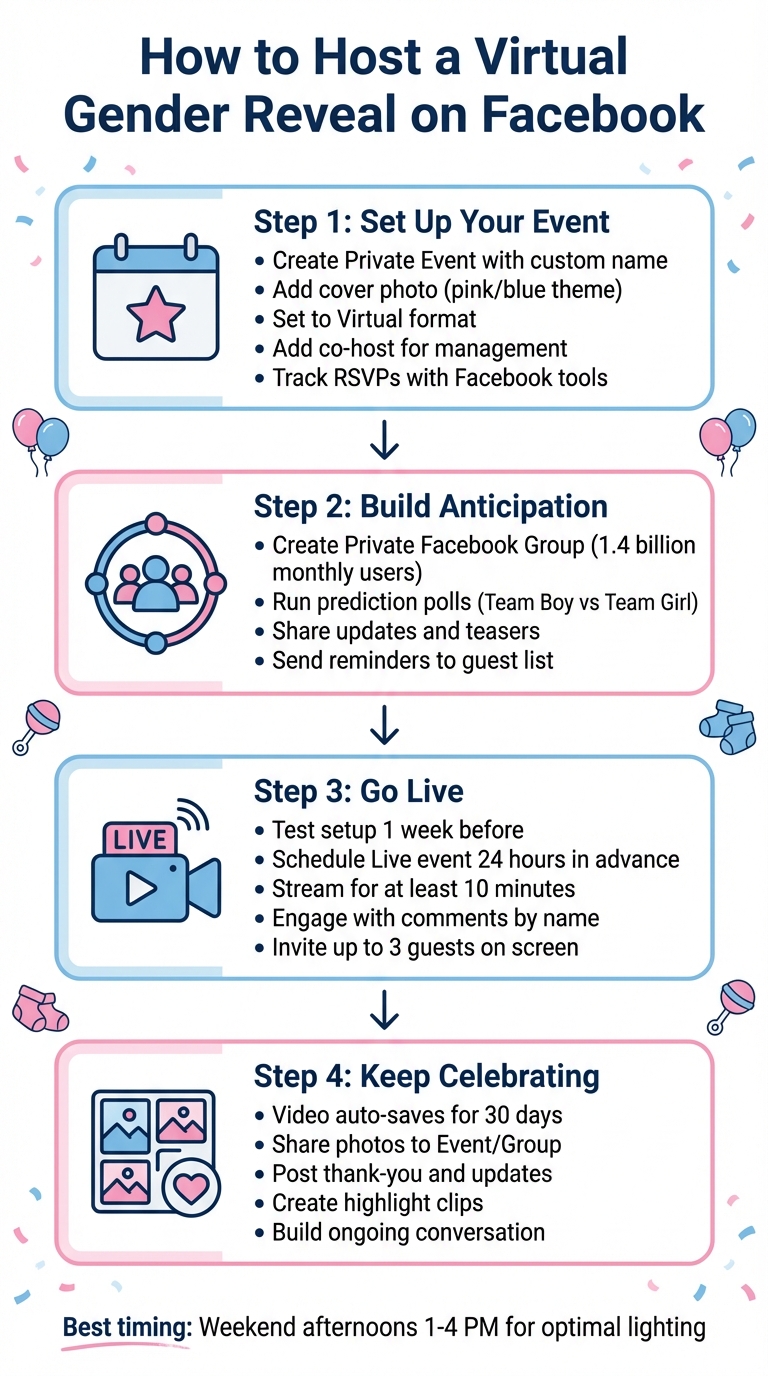
How to Host a Virtual Gender Reveal on Facebook: 4-Step Guide
How to Set Up a Facebook Event for Your Gender Reveal
Create and Customize Your Event
To get started, head to the Events section on Facebook (you might need to click "See More" to find it), then select + Create New Event.
Choose an event name that adds a little excitement, like "Baby Smith's Big Reveal!" Enter the date and time, and when asked about the event type, select Virtual. For the format, go with Facebook Live if you’re expecting over 50 guests, External Link if you’re using another platform, or Other for custom instructions.
Make sure to set the event to Private - you won’t be able to change this once the event is live. Add a fun cover photo that hints at the big surprise (think pink and blue decor or a playful question mark). In the description, build some anticipation without spoiling the reveal. You can also add your partner as a co-host to help manage guest interactions and posts.
Once your event is set up, you can focus on managing your guest list with Facebook’s RSVP tools.
Track RSVPs with Facebook's Event Tools
After publishing your event, use the See who responded feature to track who’s marked themselves as "Going", "Interested", or hasn’t replied yet. This keeps you updated on attendance and helps you plan fun extras like polls or games.
Take advantage of the Send a message to your guest list option to keep everyone informed. Send reminders the day before with the event time or share a teaser asking guests to guess pink or blue. You can even message all "Going" or "Maybe" attendees at once. If you’ve already created a private Facebook Group for your guests, the Invite group members tool makes it easy to add them to your event.
Use Facebook Groups and Polls to Build Anticipation
Start a Private Group for Your Guests
Setting up a Facebook Group is a fantastic way to keep your guests engaged and excited leading up to your gender reveal. With about 1.4 billion people using Facebook Groups every month, chances are your guests are already familiar with how these groups work.
To get started, click the "Groups" tab in your Facebook Feed and select "Create new group." Give your group a fun and creative name like "Baby Smith's Big Reveal Crew" and set it to Private so only members can see posts and the member list. For extra privacy, choose the Hidden (or "Secret") option. Add a themed cover photo, write a brief description with details about your reveal timeline, and invite your guests by either selecting them from your Facebook friends list or sharing a private link.
This group can be your go-to space for sharing updates like ultrasound photos, nursery progress, or even potential baby names. If you want to be surprised along with your guests, you can appoint a trusted friend or family member - your "Trustee" - to manage posts and updates while keeping the secret under wraps.
Run Prediction Polls
Polls are a simple yet entertaining way to get everyone involved and talking before the big day. In your group, click "Write something..." and select the poll option to create a fun voting game. Ask your guests to pick a side - Team Boy or Team Girl - and watch as the results roll in. The real-time updates add a bit of friendly competition and keep everyone engaged.
You can also take it a step further by asking for predictions on the baby’s birth date, weight, or length. Start these polls a week or two before your reveal to keep the group buzzing with activity. To make it even more fun, consider offering small digital prizes or shout-outs during your Facebook Live stream for the most accurate guesses.
During your live stream, you can also include polls to keep the energy high and the audience involved. These interactive features make the lead-up to your reveal more exciting and set the stage for a memorable celebration. By combining polls with your event setup and live streaming, you’ll create a seamless and engaging experience for everyone.
Stream Your Gender Reveal with Facebook Live
Get Ready for Your Facebook Live Stream
A smooth live broadcast can make your virtual gender reveal unforgettable and keep your guests engaged from start to finish.
Run a full test at least a week before the big day. Do a complete rehearsal with a small group to check for any connectivity or audio issues. This "trial run" gives you time to troubleshoot and resolve problems before the main event.
Your internet connection is key to avoiding interruptions. Have a mobile hotspot ready as a backup to ensure your broadcast goes off without a hitch. Nothing should disrupt the big moment.
Plan your camera setup carefully. Position your camera to capture the entire reveal moment. Use a tripod or a stable mount to avoid shaky footage, which can take away from the excitement.
Schedule your Facebook Live event at least 24 hours in advance. To do this, go to your Feed, click "What's on your mind?", select "Live Video", and then choose "Create event". This will automatically notify your guests and build anticipation. However, make sure to select your privacy settings (Public, Friends, or Private) wisely, as they can’t be changed later. Once everything is tested and scheduled, you’re ready to go live and share the big news.
Go Live and Save the Video
After confirming your setup works perfectly, it’s time to start your live broadcast.
Stream for at least 10 minutes to give everyone time to join. Eventbrite notes, "If your broadcast is too short, you won't give people enough time to tune in. Facebook recommends being Live for at least 10 minutes".
During the stream, engage with your audience by acknowledging guests in the comments by name. This adds a personal touch and makes everyone feel included, even from afar. You can also invite up to three guests to join you on screen, which is a great way to involve grandparents or close friends so they can share their reactions live.
Facebook automatically saves your Live broadcast for 30 days, allowing anyone who missed it to watch the replay. After the stream, you can download the video, create highlight clips of the reveal moment, or share it to your Event page. This way, the joy of the celebration lasts long after the confetti settles.
sbb-itb-bc05356
Gender Reveal Ideas That Work Well on Facebook
Add Interactive Activities
Turn your Facebook Live into an engaging experience by using features that let your guests actively participate. For instance, try using polls during the live stream - guests can vote on whether they think it’s a boy or a girl, and the results can pop up in real time for everyone to see.
Another fun idea is hosting a virtual scavenger hunt. Challenge your viewers to find baby-related items around their homes and show them on camera. It’s a playful way to keep the energy high and get everyone involved. You can also invite your guests to drop "Baby Wishes" in the comments. These heartfelt messages become digital keepsakes you can cherish forever.
Amp up the excitement with emoji reactions at the exact moment of the reveal. This creates a burst of colorful, on-screen applause that adds to the celebration. As GenderReveal.live Blog puts it, “Emoji reactions turn virtual parties from flat broadcasts into lively, connected celebrations by boosting real-time emotion, engagement, and host feedback”. It’s a simple way to make everyone feel like they’re part of the moment.
These interactive elements work beautifully with your event setup, creating a lively and memorable reveal.
Plan Camera-Friendly Reveal Moments
After setting the stage for guest interaction, focus on creating a visually stunning reveal.
Choose reveal methods that pop on camera. Think balloon box openings, confetti cannons, or colored smoke bombs - these all deliver eye-catching moments that look fantastic on a live stream.
Timing matters, too. Aim for a weekend afternoon between 1:00 PM and 4:00 PM to take advantage of natural lighting. Good lighting ensures every detail is captured perfectly. Also, position your camera so it frames both the reveal and your reactions clearly. This way, your audience won’t miss a single moment of the excitement.
Keep the Celebration Going After the Reveal
Share Photos and Videos from the Event
The reveal doesn’t have to end when the confetti hits the ground. Keep the energy alive by uploading photos and video clips to your Facebook Event’s "Discussion" tab or your private Group's main feed. This allows your guests to relive the moment, comment, and share their reactions whenever they want.
Make sure to save your Facebook Live video to your timeline or group. You can even trim it into shorter highlight clips for easier viewing. Encourage guests to share their own screenshots or videos too - creating a shared digital album of memories.
"A private event is only visible to the people who are invited. They can see the event description, photos, posts and videos." - Facebook Help Center
But don’t stop there - keeping the conversation going is key to staying connected.
Keep the Conversation Going
Post a heartfelt thank-you and share updates about your baby journey - like nursery progress, baby name ideas, or upcoming milestones. These updates keep everyone engaged and excited for what’s ahead.
If the gender prediction turns out to be wrong, use it as a lighthearted "plot twist" to re-engage your guests. It’s a perfect way to spark another round of fun and laughter. You can also invite your guests to share advice, parenting tips, or even funny stories in the comments. Keeping the dialogue alive transforms your reveal into an ongoing connection throughout your pregnancy.
Conclusion: Connect with Loved Ones Anywhere
Facebook's free tools make it easy to bring loved ones together for your virtual gender reveal, no matter where they are. Whether your parents are miles away or your best friend is stationed overseas, features like Facebook Events, Groups, and Live streaming ensure everyone can share in your special moment.
One of the best parts about using Facebook is its familiarity - most people already know how to navigate it. With Facebook Live, even those who aren't tech-savvy can join with just one click. Plus, your event page becomes more than just a planning tool; it turns into a memory hub that you can revisit anytime.
"Facebook events has become my go-to tool when it comes to scheduling events. It's so easy to announce your event to attendees and share important information." - Kaelin Zawilinski, Content and Social Manager at Oriental Trading
Your event page serves as a digital scrapbook, storing photos, videos, and memories securely. With customizable privacy settings, you can ensure that only your chosen circle gets to share in these cherished moments.
From tracking RSVPs and creating engaging polls to live streaming and sharing photos, Facebook brings everything together in one place. It’s a perfect way to coordinate across time zones, build excitement, and keep everyone connected throughout your celebration.
FAQs
What are some tips for hosting a smooth Facebook Live virtual gender reveal?
To make sure your Facebook Live gender reveal goes smoothly, start by setting up a dedicated event. Decide where you’ll host it - on your timeline, a page, or in a private group. Give it an engaging name like “Our Baby's Big Reveal” and pick a specific date and time, such as May 15, 2026, at 3:00 PM EST. Use Facebook’s RSVP tools to track who plans to attend and to send out automated reminders so your guests don’t miss the big moment.
Before the big day, do a private test run to check your video and audio quality. Ensure your Wi-Fi connection is reliable, the lighting is good, and your camera is positioned at eye level for the best view. Consider assigning a co-host to help manage comments and keep the event running smoothly. To add some extra excitement, post a poll beforehand so guests can guess the baby’s gender, and don’t forget to share photos or highlights after the reveal to keep the celebration going!
Lastly, prepare a backup plan - like having a second device ready or creating a pre-recorded reveal video - just in case you run into any technical hiccups. With a little planning, your virtual gender reveal can be a fun and unforgettable event for everyone watching!
How can I make my Facebook virtual gender reveal fun and engaging for guests?
Use Facebook’s interactive tools to turn your gender reveal into an exciting and engaging event that everyone will remember. Start by creating a live prediction poll where guests can vote "boy" or "girl" before the big reveal. This simple activity builds suspense and gets everyone involved. To keep the momentum going, post a countdown on the event page as the big day approaches, fueling excitement.
When it’s time for the reveal, go live on Facebook and make it a true celebration by adding fun effects like virtual confetti or balloons. Encourage guests to join in by sharing their own photos, video messages, or even their gender guesses in the event’s photo album. After the event, upload a private photo gallery exclusively for RSVP’d guests, giving them a chance to relive the moment and leave comments.
Facebook’s RSVP features make it easy to track attendance and send reminders, ensuring no one misses out. Platforms like GenderReveal.live can take it up a notch with live voting boards, countdown timers, and themed templates. Together, these tools help create a virtual gender reveal that’s interactive, personal, and packed with unforgettable moments.
How can I keep the excitement going on Facebook after my gender reveal?
Keep the excitement going by sharing the best moments and connecting with your guests! Post your reveal video and photos on the event page with a heartfelt caption to let everyone relive the special day. You could even create a dedicated photo album on your timeline and tag guests who uploaded their own pictures - this way, all those memories stay easy to find.
Want to keep the fun rolling? Start a playful poll, like asking for baby name ideas, or go live on Facebook for a quick Q&A session. Share updates, like a sneak peek of the nursery, to keep everyone in the loop. Don’t forget to show your appreciation with a pinned post that includes a thank-you note, links to your gift registry, or a heads-up about exciting milestones, like your upcoming baby shower.
If you used a platform like GenderReveal.live for RSVPs, take advantage of their tools to send reminders or share updates effortlessly. It’s a great way to keep everyone connected and the celebration alive!