

Ultimate Guide to Virtual Reveal Run of Show
I plan a virtual reveal by setting the reveal time first, then working backward. For a 50-minute event, reserve the final 10–15 minutes for the reveal, reactions, and keepsakes. If you run late, shorten a game - not the time for reactions.
Here’s what I put in place before guests join:
- Two separate documents: A simple guest schedule and a private host cue sheet, with the secret result restricted to the trustee and approved backup.
- Named roles: Someone to lead, manage guests, protect the surprise, and handle tech.
- A timed plan: arrivals, virtual gender reveal countdowns, a family update, an optional children’s activity, wishes, a readiness check, and the reveal.
- A tested backup: Rehearse the guest flow and reveal, set a 5-minute troubleshooting limit, and postpone if permission or the result is unclear.
- Consent and follow-up: Offer no-camera options, <u>ask before recording or taking screenshots</u>, and send approved photos and messages within 3–5 business days.
My rule: give every segment an owner, every key task a backup, and every guest a choice in how to join in.
Choose the Schedule and Assign Roles
Keep the reveal in the final 10–15 minutes, then confirm attendance and put someone in charge of each segment.
Check the parents’ exact reveal wording and confirm who knows the result. Agree on rules for recording, screenshots, and sharing, along with who gets the keepsakes and how long they can keep them.
Invitations, Time Zones, and Arrival Details
Include the date, relevant time zones, and expected end time. Open the room 15 minutes early, but stick to the advertised start time.
Set an RSVP deadline. Include the join link, room opening time, event duration, participation options, and support contact in the invitation.
Send one reminder several days before the event and another on event day. Both should repeat the join link, room opening time, and support contact.
With the guest details covered, assign arrivals, timing, and surprise protection.
Host, Co-Host, Trustee, and Backup Roles
Give each person a clear job:
- Host: Handles transitions and timing.
- Co-host: Manages chat and welcomes arrivals.
- Trustee: Holds the confidential result and protects the surprise.
- Backup helper: Handles audio, countdown controls, and platform actions.
Name an authorized backup for each critical job and write down the cue for taking over. For smaller gatherings, one person can handle both co-host and backup-helper duties. Keep surprise protection with a separate trustee.
Event Setup and Participation Options
Choose a GenderReveal.live themed template, add prediction voting and message collection, and give the backup helper control of the countdown. Plan predictions for arrivals, messages for the middle of the event, and the countdown for the final minutes.
If the parents want to be surprised, have the trustee manage the result in trustee mode. Check that the parents can’t see it early.
Test the guest flow on phones, tablets, and computers before sending instructions.
Make cameras, predictions, and children’s activities optional. Give guests a private way to send wishes, read important visuals aloud, and ask about captions or other access needs before the event. Keep themes and prompts focused on welcoming the baby - not future traits or identity.
Place each activity into the run of show, with its timing and assigned owner.
sbb-itb-bc05356
Build a 50-Minute Timeline and Host Script
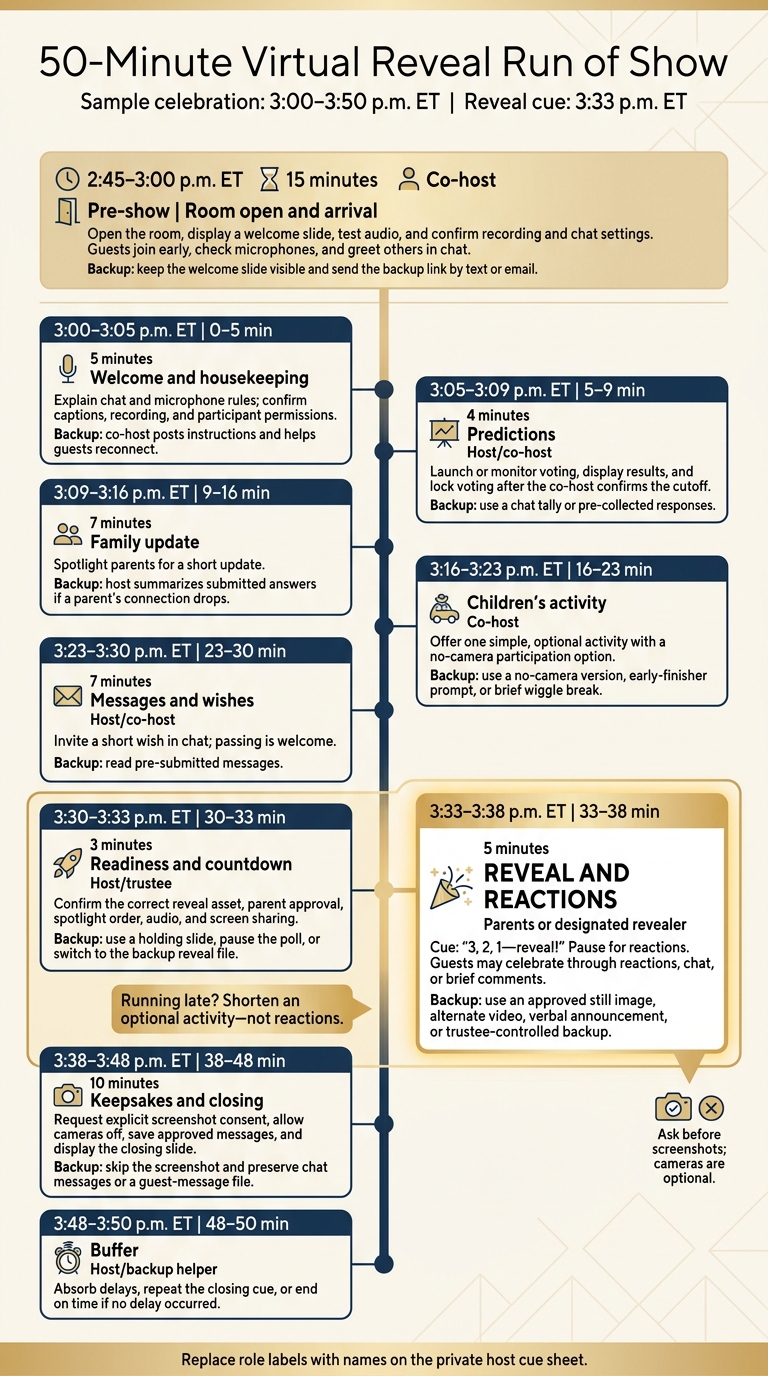
50-Minute Virtual Reveal Run of Show
Turn your gender reveal ideas and role assignments into a minute-by-minute script, with clear cues for the host, co-host, trustee, and backup helper. The cue sheet should spell out when to act and what to do if something goes wrong.
This sample covers a 3:00–3:50 p.m. ET celebration, with the reveal fixed at 3:33 p.m. ET. All times are ET, and running time begins at 3:00 p.m. Replace role labels with names before sharing the final sheet.
The sheet covers each segment, its owner, host cues, platform actions, guest instructions, and backup plans.
Clock time Running time Segment Owner Host cue Platform action Guest instruction Backup plan 2:45–3:00 p.m. ET Pre-show Room open and arrival Co-host Welcome! We’ll begin at 3:00 p.m. ET. Open room, display welcome slide, test audio, confirm recording and chat Join early, check microphone, use chat for greetings Keep a welcome slide visible; send the backup link by text or email 3:00–3:05 0–5 min Welcome and housekeeping Host Please keep microphones muted unless invited to speak. Confirm chat, captions, recording, and participant permissions Say hello in chat and reconnect if audio or video fails Co-host posts instructions and admits or reconnects guests 3:05–3:09 5–9 min Predictions Host/co-host Please submit your predictions now. Voting closes in one minute. Launch or monitor poll; display results; lock voting Vote through the poll or submit a chat response Use a chat tally or pre-collected responses; the co-host confirms the cutoff 3:09–3:16 9–16 min Family update Parents Thank you for your predictions. Now the parents will share a short update. Spotlight parents and keep the family-update slide available Listen; add supportive reactions in chat Host summarizes submitted answers if a parent’s connection drops 3:16–3:23 16–23 min Children’s activity Co-host We’ll do one simple activity. Draw or choose your answer, then show it when invited. Share an activity slide or timer; monitor chat Draw, move gently, vote, or have a parent submit an answer Offer a no-camera version, an early-finisher prompt, or a brief wiggle break 3:23–3:30 23–30 min Messages and wishes Host/co-host Share a short wish in chat, or pass if you prefer. Collect or display selected messages Type a wish, use a reaction, or remain off camera Read pre-submitted messages if guests cannot speak 3:30–3:33 30–33 min Readiness and countdown Host/trustee Trustee, please confirm we’re ready. Confirm the correct reveal asset, spotlight order, audio, and screen share Stay muted and keep cameras ready if comfortable Use a holding slide, pause the poll, or move to the backup reveal file 3:33–3:38 33–38 min Reveal and reactions Parents or designated revealer On my cue: 3, 2, 1 - reveal! Then: Let’s take a moment for reactions. Start the reveal, spotlight parents, pause for reactions, and capture approved reactions Celebrate through reactions, chat, or brief comments Use a still image, alternate video, verbal announcement, or trustee-controlled backup 3:38–3:48 38–48 min Keepsakes and closing Host/co-host With permission, we’ll take one group screenshot. You may turn off your camera. Request consent, take the screenshot, save messages, and display the closing slide Opt in, turn off camera, or change display name; share final wishes Skip the screenshot and preserve chat messages or a guest-message file 3:48–3:50 48–50 min Buffer Host/backup helper We’re taking a brief final pause before we close. Keep the holding or thank-you slide visible Remain in the room or use chat for final notes Absorb delays, repeat the closing cue, or end on time if no delay occurred
Arrival, Welcome, and Predictions
Using specialized gender reveal tools can help automate these interactive segments.
Keep the arrival screen visible until 3:00 p.m. Then welcome guests and explain the chat and microphone rules. Lock predictions only after the co-host confirms the cutoff.
Family Update, Children’s Activity, and Wishes
Keep these three segments short and on schedule: the family update, one child-friendly activity, and wishes. Give one instruction at a time, with a low-pressure, no-camera option.
Readiness Check, Countdown, and Reveal
Use 3:30–3:33 p.m. ET to check the reveal asset, confirm parent approval, and start the countdown. Keep the reveal on time even if earlier segments run long.
Keepsakes and Closing
Use this block to request screenshot consent, hear final wishes, thank guests, and explain private-sharing instructions. Ask for explicit consent before taking the screenshot.
Rehearse and Prepare for Delays
Once the run of show is set, rehearse it from start to finish before guests join.
Rehearsal and Readiness Checklist
Hold a full rehearsal one week before the event, a shorter check 24 hours before, and a final team check 10–20 minutes before guests enter. Use the devices, connection, and settings planned for the live reveal. Test guest entry, automated reminders, one-click check-ins, real-time head count, audio, screen sharing, countdowns, voting from a guest account, trustee access, reveal media, and any recording or photo collection. Practice both your online gender reveal ideas and their approved backup to keep the reveal on time within the 50-minute schedule.
Before sharing your screen, close unrelated apps and turn off notifications. Share only the intended window or presentation. Check filenames, thumbnails, open tabs, recent files, and chat attachments for clues. Choose a neutral filename, such as Reveal-Asset-01. Confirm the voting cutoff, who can start or pause the reveal, who can cancel it, and how the approved backup person will access the reveal image. Test that result access stays restricted.
Label the final cue sheet with the event date in U.S. format, time zone, version number, last-updated timestamp, and named role owners. Add private contact methods for the hosting team, but share the document only through an access-controlled channel. Keep one read-only master copy and one clearly marked live copy. Store ordinary run-of-show instructions separately from the secret reveal result, and label the result Approved reveal team only.
After the dry run, shift from setup checks to backup plans.
Backup Plans and Guest Scripts
Set a 5-minute troubleshooting limit to protect the reveal window. Practice each handoff and read the guest scripts aloud. Before guests arrive, create a private team text thread for emergency coordination. Use phone calls only if texts fail. If you can’t confirm permission or result accuracy by the cutoff, postpone the reveal. Don’t guess or display an unverified asset.
| Problem | Owner | Immediate action | Guest-facing script |
|---|---|---|---|
| Host disconnects | Co-host | Continue the current segment and contact the host privately. | <blockquote>“The host is reconnecting now. Please stay with us and add a wish for the baby in the chat.”</blockquote> |
| Trustee disconnects | Backup trustee | Invite brief wishes and contact the trustee privately. Use the approved backup reveal card or image only after permission is confirmed. | <blockquote>“We’re taking a short pause before the reveal. Please share one wish for the baby and parents.”</blockquote> |
| Audio or screen sharing fails | Technical helper | Stop sharing and switch to a tested backup device or local file. Limit troubleshooting to a few minutes. | <blockquote>“We’re refreshing the presentation. You can still participate by posting your prediction in the chat.”</blockquote> |
| Voting is unavailable | Co-host | Replace the poll with chat predictions and record responses manually. | <blockquote>“The poll is unavailable, so type your prediction in the chat instead.”</blockquote> |
| Early disclosure | Host | Stop the affected share or message, verify what guests saw, and proceed only with the parents’ consent. | <blockquote>“We’re adjusting the reveal moment so everyone can experience it together.”</blockquote> |
| Attendance changes | Co-host | Admit late guests and repeat only the instructions they need. | <blockquote>“Welcome! We’re in the predictions portion now; add your guess in the chat.”</blockquote> |
| Schedule overruns | Host | Cut optional activities first. Keep the readiness check, countdown, reveal, and brief keepsake moment. | <blockquote>“We’re moving ahead to the reveal so we can keep the celebration on schedule.”</blockquote> |
Save Photos and Messages, Then Follow Up
After the reveal and closing, move straight into collecting and sending the recap.
Assign the co-host to collect approved messages and save the post-reveal recap. Test whether messages can be saved or exported before promising copies. Use this prompt:
“Share one wish for the baby and parents.”
Save approved photos and wishes in the recap. Record separate permissions for private sharing and public posts, and use those permissions to guide distribution. Remove material if someone withdraws permission.
Name a recap owner and have them deliver it within 3–5 business days.
Conclusion: Check Your Final Run of Show
Before guests enter, check the run of show one last time to keep the online gender reveal on schedule. Confirm that guests received the invitation details and accessibility notes. Check attendance so the co-host can privately message anyone whose presence is needed but who hasn’t arrived.
Next, read the final cue sheet aloud. Each person should know their trigger, backup plan, and who they’ll hand off to. Make a go/no-go decision before the room opens: proceed as planned or simplify if a minor issue remains.
Keep children’s activities to 5–10 minutes. Give one instruction at a time, and shorten the activity when attention starts to fade.
Set aside 2–5 minutes for a group screenshot and one final wish. Get consent before recording any family reactions. Leave room for reactions, breaks, and the people gathered for the moment.
FAQs
How can I shorten the celebration to 30 minutes?
Keep the agenda short, use GenderReveal.live’s built-in RSVP reminders to encourage guests to arrive on time, and assign a co-host to keep the event moving.
Plan the 30-minute celebration around these time slots:
- 0–5 minutes: Welcome guests and cover housekeeping.
- 5–15 minutes: Run a live prediction poll.
- 15–25 minutes: Share messages or play a short trivia game.
- 25–30 minutes: Hold the synchronized countdown, reveal, cheers, and goodbyes.
This pacing keeps guests engaged without too much screen time.
How can I include both in-person and virtual guests?
Give virtual guests one link to join live through GenderReveal.live - no downloads needed. Invite in-person guests to join the live stream, too, so everyone can take part in prediction polls and the countdown.
Mail color-coded props or confetti cannons to remote guests so they can join the reveal at the same moment. Have a co-host handle the stream and chat so you can focus on celebrating with everyone.
What if an important guest misses the reveal?
If an important guest misses the live reveal, they can still share in the joy. Record the entire event from the start, including the big moment, and send them the video afterward.
For future events, use GenderReveal.live to send automated reminders before the big day so more of your loved ones can join the live celebration on time.