

Top 5 Games for Virtual Baby Showers
Virtual baby showers are a great way to celebrate with loved ones, no matter where they are. Here are five fun games to keep everyone engaged and entertained:
- Baby Trivia: Guests answer questions about babies, parenting, or the parents-to-be. Prepare 15–25 questions and use slides or polling tools for easy participation.
- Baby Picture Guessing: Match childhood photos to the grown-up guests. Collect photos in advance and share them during the event for a fun, nostalgic activity.
- The Price Is Right (Baby Edition): Guests guess the prices of baby items like diapers or bottles. Use slides or live displays to showcase the items.
- Scavenger Hunt: Guests race to find items like "something soft" or "a baby-themed object" in their homes. Points are awarded for speed and creativity.
- Emoji or Pictionary Game: Solve baby-themed emoji puzzles or draw prompts like "diaper change" while others guess.
Pro Tip: Tools like GenderReveal.live can simplify hosting with features like RSVP tracking, live voting, and countdowns.
Stick to 2–4 games for a 60–90 minute event, and make sure instructions are clear so everyone can join the fun. These activities are simple to organize, require minimal setup, and ensure a lively celebration for the parents-to-be.
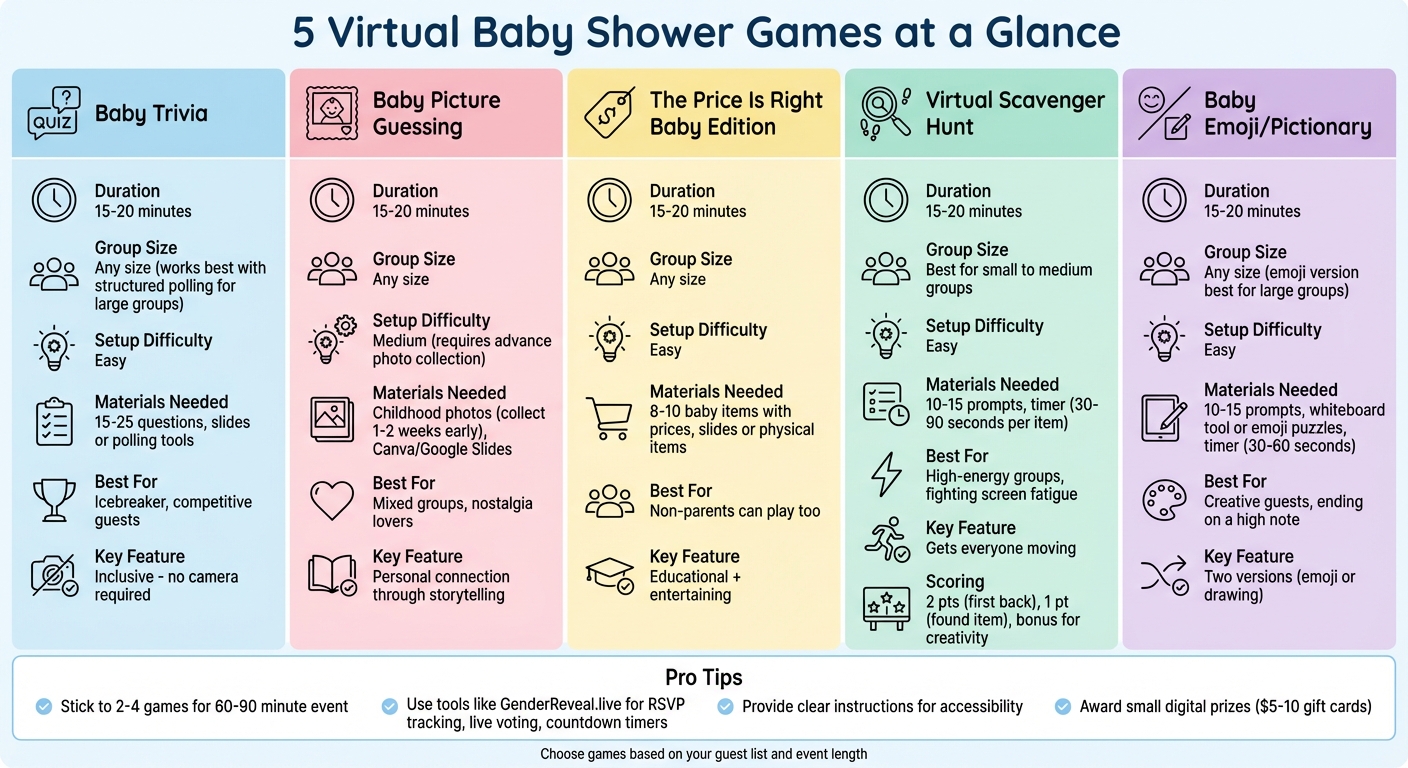
5 Virtual Baby Shower Games Comparison Guide
10 Baby Shower Games For the Zoom App

1. Virtual Baby Trivia
Virtual baby trivia is a fun, quiz-style game where guests answer questions about babies, pregnancy, parenting, or even personal trivia about the parents-to-be. It’s a perfect icebreaker because it’s inclusive - guests don’t need to be on camera the whole time and can easily participate through a video call.
To get started, the host prepares 15–25 questions in advance. A good mix of easy and challenging questions keeps things lively and competitive. Popular categories include baby milestones, baby animal names, parenting facts, and fun tidbits about the expecting parents to make it more personal.
Sharing the questions is simple. Create slides using tools like PowerPoint or Google Slides, with one question per slide, and use your video platform’s screen share feature so everyone can follow along. For smaller groups (up to 15–20 households), guests can type their answers in the chat. For larger gatherings, use built-in polling or quiz tools to automate scoring and display leaderboards. Platforms like GenderReveal.live even allow interactive voting, where guests can tap their answers in real time, keeping things organized and visually engaging.
Keep the game short and snappy - about 15–20 minutes - with your prepared questions. At the end, announce the top three players and award a small digital prize, like a gift card or a coffee delivery, to the winner. To make it accessible, use high-contrast text on slides and speak clearly so everyone, including those joining by phone, can participate comfortably.
What’s great about baby trivia is that it works for any group size. In smaller showers, the game can feel more personal, with guests unmuting to shout out answers or share stories. For larger events, structured polling and muted microphones help maintain order while ensuring everyone stays involved. It’s a fantastic way to spark conversations and keep guests engaged throughout the celebration.
2. Baby Picture Guessing Game
The baby picture guessing game is a nostalgic hit that works perfectly in virtual settings. Here's how it works: each guest submits a childhood photo, and during the shower, everyone tries to match the adorable baby faces with the grown-up guests on the call. It's a simple yet entertaining way to spark laughter and connection.
To get started, collect the photos via email or a shared folder about 1–2 weeks before the event. Use Canva or Google Slides to create a numbered collage of all the photos. Be sure to set a firm deadline for submissions - ideally 3–5 days before the shower - so you have enough time to organize everything.
During the event, share your screen and display the photos one by one. Give guests 30–60 seconds per photo to type their guesses in the chat. Once everyone has had a chance to guess, reveal the answers and tally up the scores. To keep things exciting, reward the winner with a small prize, like a $10 Amazon gift card. This light-hearted competition is a great way to kick off the fun and set the tone for the rest of the shower.
What makes this game stand out is the personal touch it brings. After the big reveal, invite guests to share a short story or memory connected to their baby photo. These little anecdotes often lead to laughter and heartfelt moments, helping everyone feel more connected - even if they're scattered across the country. It’s especially great for mixed groups, like blending the mom-to-be’s college friends with her partner’s family.
The charm of this game lies in its universal appeal. Kids enjoy the challenge of matching baby faces, adults love the trip down memory lane, and older relatives often shine with their knack for recognizing family traits. Plus, it’s easy to set up and doesn’t require any fancy tech skills, making it accessible for guests of all ages and abilities.
3. The Price Is Right Baby Edition
Bring some game-show fun to your virtual baby shower with The Price Is Right Baby Edition. This activity has your guests guessing the retail prices of everyday baby items, adding a dose of friendly competition to the event.
Here’s how it works: share a slide deck with photos of baby products or hold up items on camera while guests type their guesses in the chat. Aim for 8–10 common baby items, such as a 96-count pack of size 1 diapers (usually $24–$30), a 3-pack of baby bottles (around $10–$18), or a bulk box of baby wipes (about $12–$20). Stick to prices from major U.S. retailers like Target or Walmart to keep things accurate and relatable.
The beauty of this game lies in its inclusivity - anyone can play. Even non-parents can join in by relying on their general shopping instincts. Plus, the surprising cost of baby essentials, like a onesie 5-pack priced at $10–$20, often leads to plenty of laughs. To mix things up, throw in a higher-priced item, like a baby monitor or stroller, to spark some lively conversation.
During the game, display each item for 20–30 seconds and collect guesses via chat, a Google Form, or your platform’s polling feature. Once all the guesses are in, reveal the actual prices one by one and calculate who came closest. To keep the energy light and fun, reward the winner with a small prize, like a $10 digital gift card.
This game fits seamlessly into your event’s schedule. If you’re using GenderReveal.live, you can take advantage of live voting tools and countdown timers to keep things moving smoothly. Plus, it’s easy to transition to other activities, like sharing registry highlights or collecting messages from guests.
sbb-itb-bc05356
4. Virtual Baby Shower Scavenger Hunt
Add some energy to your baby shower with a Virtual Baby Shower Scavenger Hunt - a lively game where guests dash around their homes to find and share specific items on camera. Unlike traditional sit-down games, this activity gets everyone moving, helping to shake off screen fatigue and boost the fun.
Here’s how it works: create a list of 10–15 prompts that include a mix of baby-themed items, everyday household objects, and some lighthearted personal touches. For example, you could ask for "Something that smells like baby lotion or soap", "An item with polka dots", "Something soft and cuddly", "Your favorite childhood book", or "An object in the nursery’s color scheme." This variety ensures everyone can participate, even if they don’t have baby-specific items at home. Share each prompt aloud and in the chat, then set a timer - 30–45 seconds for easier items or 60–90 seconds for more unique or sentimental ones. Guests then race to find the item, return, and show it off.
Scoring is simple and keeps things competitive:
- 2 points for the first person back.
- 1 point for anyone who finds the item.
- A bonus point for the funniest or most creative entry, as voted by the group.
A co-host or helper can track scores using a spreadsheet. After 2–3 rounds, announce the winner and send them a small prize, like a $5–$10 e-gift card.
This game is perfect for guests of all ages. To make it inclusive for grandparents, kids, or anyone with mobility challenges, focus on items that are easy to grab or close by. You can also allow family members to team up and accept creative interpretations - like a fluffy towel as "something cozy for baby." If you’re hosting on GenderReveal.live, you can use their built-in countdown timers and live voting tools to streamline the game and give it a polished, game-show vibe. Their RSVP management and themed templates also make planning a breeze. This scavenger hunt is a great way to energize your guests and set the tone for more interactive fun!
5. Baby Emoji or Pictionary Style Game
End your virtual baby shower on a high note with a fun and creative activity: Baby Emoji or Pictionary. This game offers two playful options - guests can either solve baby-themed emoji puzzles (like 👶🍼 for "baby bottle" or 🛁👶 for "baby bath") or take turns drawing baby-related prompts while everyone else tries to guess. Both versions are simple to organize on your video platform and ensure everyone stays engaged.
The emoji puzzle version works well for larger groups or guests who might feel shy about being on camera. Prepare 10–15 baby-related emoji combinations ahead of time - examples include 🛏️🌙👶 for "sleeping through the night" or 🚼🔄 for "diaper change." Share each puzzle one at a time, and participants can type their guesses in the chat. Award a point to the first person with the correct answer.
For the drawing option, use tools like Zoom's whiteboard, Google Meet's annotation feature, or a free online drawing platform. Give each participant 30–60 seconds to sketch prompts such as "changing a diaper", "baby stroller", or "bedtime story" while others guess. Rotate the role of the artist to ensure everyone gets a chance to participate.
What makes this game so much fun is the laughter and creativity it sparks. Whether someone is sketching a diaper change or crafting an emoji combo for "don't wake the baby", the activity keeps the energy high and mimics the lively vibe of an in-person party. You can even personalize the prompts with familiar U.S. themes, like "Baby's first Fourth of July fireworks" or "Sunday football nap with Dad", to make it feel more special for your group.
To keep the game running smoothly, assign someone to track scores and use a 30–60 second timer for each clue. Plan for about 15–20 minutes of playtime, covering 10–15 prompts. At the end, reward the winner with a small digital prize. If you're hosting on GenderReveal.live, take advantage of its built-in features like countdown timers, live voting, and RSVP management to streamline the experience while keeping your guests connected. This game is a fantastic way to bring everyone together and leave them with smiles long after the event ends.
Tools to Make Hosting Easier
Games might keep the party buzzing, but having the right hosting tools ensures everything runs like clockwork. Planning a virtual baby shower can feel overwhelming with tasks like managing invitations, tracking RSVPs, handling game materials, and coordinating video calls. That’s where GenderReveal.live steps in. This all-in-one, browser-based platform simplifies the process with built-in tools like RSVP tracking, live voting, countdown timers, and themed templates that work effortlessly on both phones and computers. These features not only make planning easier but also add an engaging, interactive touch to your games.
Managing guest details can be a headache, but Smart RSVP Management takes the stress out of it. This feature automatically collects RSVPs and guest information, so you won’t need to send countless follow-up texts. For a party with attendees spread across U.S. time zones, having a clear headcount and displaying event details - like "Saturday, March 15, 2025, 3:00 PM ET" - alongside a synchronized countdown timer keeps everyone on the same page and minimizes last-minute confusion.
Live voting adds an exciting twist to the games mentioned in this article. Whether it’s trivia, baby photo slideshows, or Price Is Right-style challenges, you can upload questions and prompts directly to the platform. Guests can vote or submit answers from their devices, with results displayed instantly on screen. To keep the suspense alive, scores stay hidden until the end of each round, and a leaderboard pops up automatically - bringing a fun, competitive edge to your virtual event.
To tie it all together, themed templates - offered in nine stylish designs - give your shower a polished, professional look. These templates cover everything from invitations to game slides and message screens, all without requiring design skills or extra software. They even enhance interactive polls and game presentations. Plus, you can include gift registry links for easy shopping at major U.S. retailers and collect heartfelt messages that either display during the event or can be saved as a digital keepsake. With over 1,000 virtual events under its belt and a stellar 4.9/5 rating, this platform handles the technical side of things so you can focus on celebrating the parents-to-be.
Conclusion
Virtual baby showers can be both easy to plan and incredibly meaningful. By selecting games that align with your guests' personalities and comfort zones, you create an atmosphere where everyone feels welcome. Whether it's trivia for the competitive crowd, baby photo guessing for sentimental family members, or emoji Pictionary for those who love a creative challenge, these shared moments of laughter and connection will become cherished memories for the parents-to-be.
To keep things running smoothly, aim for simplicity. Stick to 2–4 games over a 60–90 minute window, include a heartfelt activity, and provide clear instructions to ensure everyone can participate. Using planning tools like automated RSVPs, countdown timers, and live voting features can streamline the process, letting you spend more time enjoying the celebration and less time managing logistics.
Today, virtual baby showers are a go-to option for families across the United States, offering the flexibility to include loved ones near and far. Grandparents in another state, friends in different time zones, and those unable to travel can all join the fun. The right games and activities can transform a simple video call into an interactive experience that brings everyone together. Combine these moments with reliable event tools to make planning effortless.
When done right, a virtual baby shower can feel just as warm and memorable as an in-person gathering - and perhaps even more inclusive for everyone involved.
FAQs
What’s the best way to ensure everyone can join in on virtual baby shower games?
Using GenderReveal.live simplifies the process of involving everyone in your celebration, regardless of their location. The platform's built-in RSVP management allows you to easily track guest responses, send out reminders, and provide seamless access to the event with just a single link.
To keep things lively, the platform offers interactive tools like live voting, prediction polls, and private photo galleries. These features not only make the event entertaining but also ensure everyone feels included and connected.
What are the best tools to organize a virtual baby shower effortlessly?
Planning a virtual baby shower can be a breeze with the right tools. Look for platforms that include RSVP management with automated reminders and real-time guest check-ins. These features make it easy to track attendance and ensure everyone is ready to join the fun.
To keep the event lively, consider interactive features like countdown timers, live voting, and prediction polls. These elements can spark excitement and keep guests involved throughout the celebration. Tools that offer private photo galleries and easy-to-share event links also help bring everyone together, no matter the distance, making the day feel extra special and effortless to organize.
How can I make virtual baby shower games more personal and fun for my guests?
To make virtual baby shower games more engaging and heartfelt, try adding interactive elements that encourage guest participation. For example, include prediction polls where guests can guess the baby's due date or features that allow them to share meaningful messages for the parents-to-be. Personalizing the games with trivia about the parents or special moments in their journey adds a thoughtful touch that everyone will appreciate. Additionally, use RSVP tools to gather guest preferences in advance. This way, you can tailor the games to match their interests, creating a fun and memorable experience for all.